



Introduction
Picture a normal Monday morning at any school office. The front desk is replying to a parent who wants admission information for Class 2nd. At the same time, the accounts team is trying to remind forty families that their term fee is due this week. The class teacher of Grade 5 needs to tell every parent that tomorrow is a half day. And somewhere in between, someone is trying to confirm the guest list for Friday's PTM.
All of this is happening on the same day, sometimes in the same hour. Phone calls get missed. SMS gets ignored because it looks like spam. Emails sit unread in an inbox nobody checks. And the school staff end up doing the same manual work again and again, every single day, every single week.
This is the real problem schools face — not a lack of communication tools, but too many scattered ones that don't talk to each other.
This is where WhatsApp Business API quietly changes the picture. Since almost every parent already has WhatsApp open on their phone throughout the day, it becomes the one channel that actually gets seen, read, and replied to. But using WhatsApp Business API the right way is not just about "sending messages." It's about building one connected communication system for the entire parent and student journey — from the first admission enquiry to the last fee reminder of the year.
And it's not just about convenience for the school. Parents today expect quick, clear answers. If a father misses a call from the school and doesn't hear back for two days, he starts to worry. If a mother sends a fee query through email and gets no reply for a week, she starts to lose trust in the school's efficiency. Communication delays don't just create operational headaches — they quietly chip away at the relationship between a school and the families it serves. Fixing this doesn't need a bigger admin team. It needs a smarter system, and that's what WhatsApp Business API brings to the table.
This guide walks through exactly how schools are using WhatsApp Business API today, in plain and simple language, without the usual sales pitch.
What Is WhatsApp Business API for Schools?
WhatsApp Business API (often called WABA) is not the same app you download from the Play Store for your personal use. It's a more advanced system built for organisations — schools, colleges, coaching institutes — that need to talk to a large number of people at once, in an organised way.
The regular WhatsApp Business App is fine for a small shop or a single admin handling a few chats a day. But a school doesn't work like that. A school has multiple departments, multiple staff members, hundreds (sometimes thousands) of parents, and dozens of different message types going out every single day.
This is exactly where the API version becomes necessary, not optional. Here's why:
Automation — Instead of a staff member typing the same fee reminder forty times, the system sends it automatically to the right parents on the right day.
Multiple users — The admissions team, accounts team, and class teachers can all use the same WhatsApp number from their own login, without fighting over one phone.
Integrations — The API can connect directly with the school's ERP or student management software, so data doesn't need to be entered twice.
Templates — Pre-approved message formats mean the school can send fee reminders, attendance alerts, and exam notices without writing a fresh message every time.
Two-way communication — Parents aren't just receiving messages; they can reply, ask questions, or click buttons to take action, and the right staff member sees that conversation.
In short, WhatsApp Business API turns a school's WhatsApp number from a simple chat tool into a proper communication system that runs quietly in the background.
WhatsApp Business App vs WhatsApp Business API for Schools
A lot of schools start with the free WhatsApp Business App, and honestly, that's not a bad starting point. But as the number of students grows, that app starts to show its limits fairly quickly.
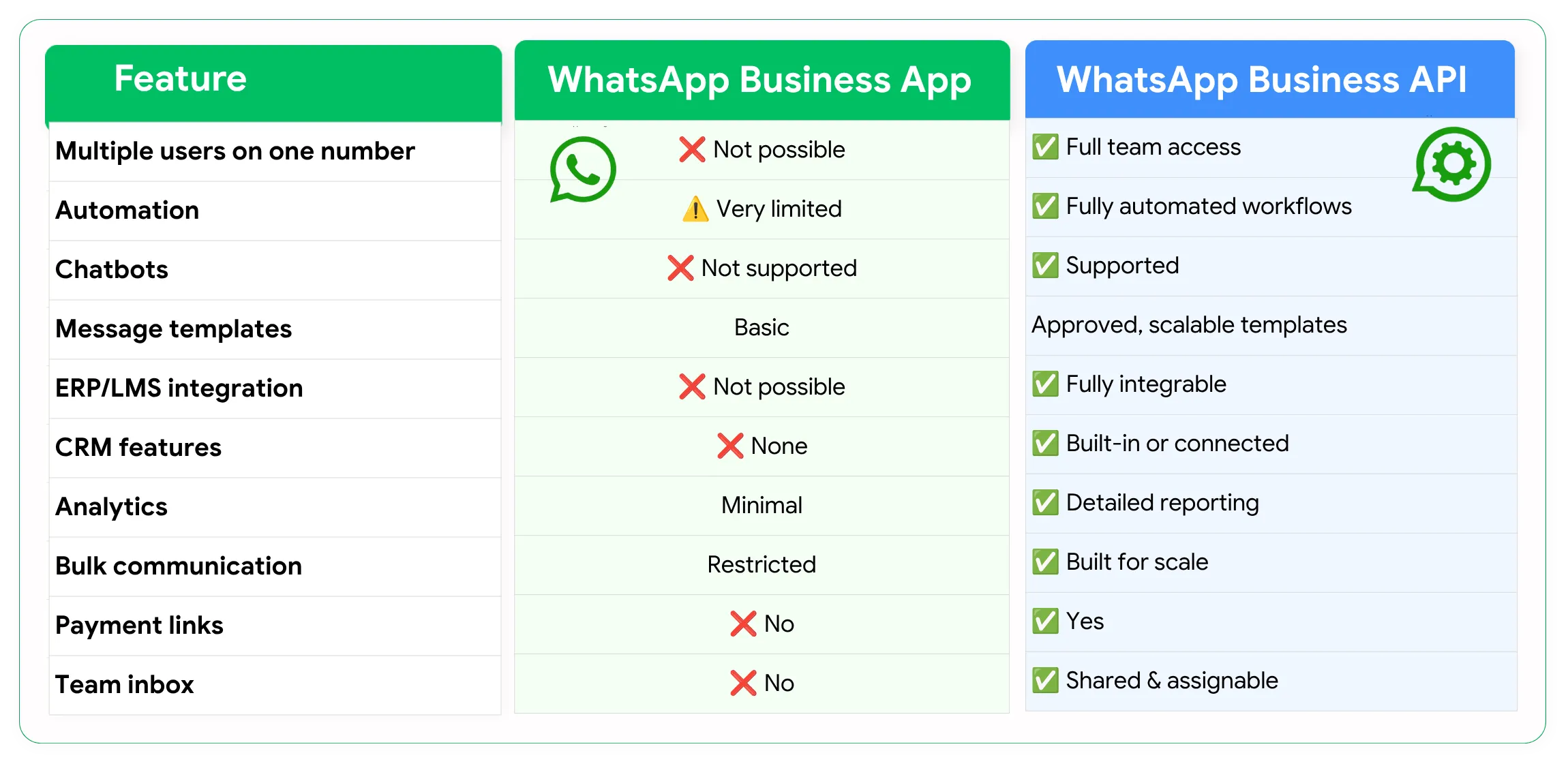
Here are the key differences:
Multiple users: The Business App has limited team access, while the API allows multiple staff members to manage conversations.
Automation: The API supports automated workflows for fee reminders, admissions, attendance, and other notifications.
Chatbots: Schools can use chatbots with the API to answer common parent and admission queries.
Message templates: The API supports approved templates for sending regular notifications at scale.
ERP/LMS integration: The API can connect with school ERP or LMS systems to automate communication based on student data.
Analytics: Schools can track message delivery, engagement, and communication performance.
Bulk communication: The API is better suited for sending approved notifications to large numbers of parents.
Payment links: Schools can include payment links in relevant WhatsApp messages.
Team inbox: Different departments can manage and respond to parent conversations from a shared system.
For a small school with one person handling a limited number of conversations, the WhatsApp Business App may be sufficient. However, when a school needs to communicate with hundreds of parents, automate repetitive tasks, manage admissions, or connect WhatsApp with its student database, the WhatsApp Business API becomes a more scalable solution.
12 Ways Schools Can Use WhatsApp Business API
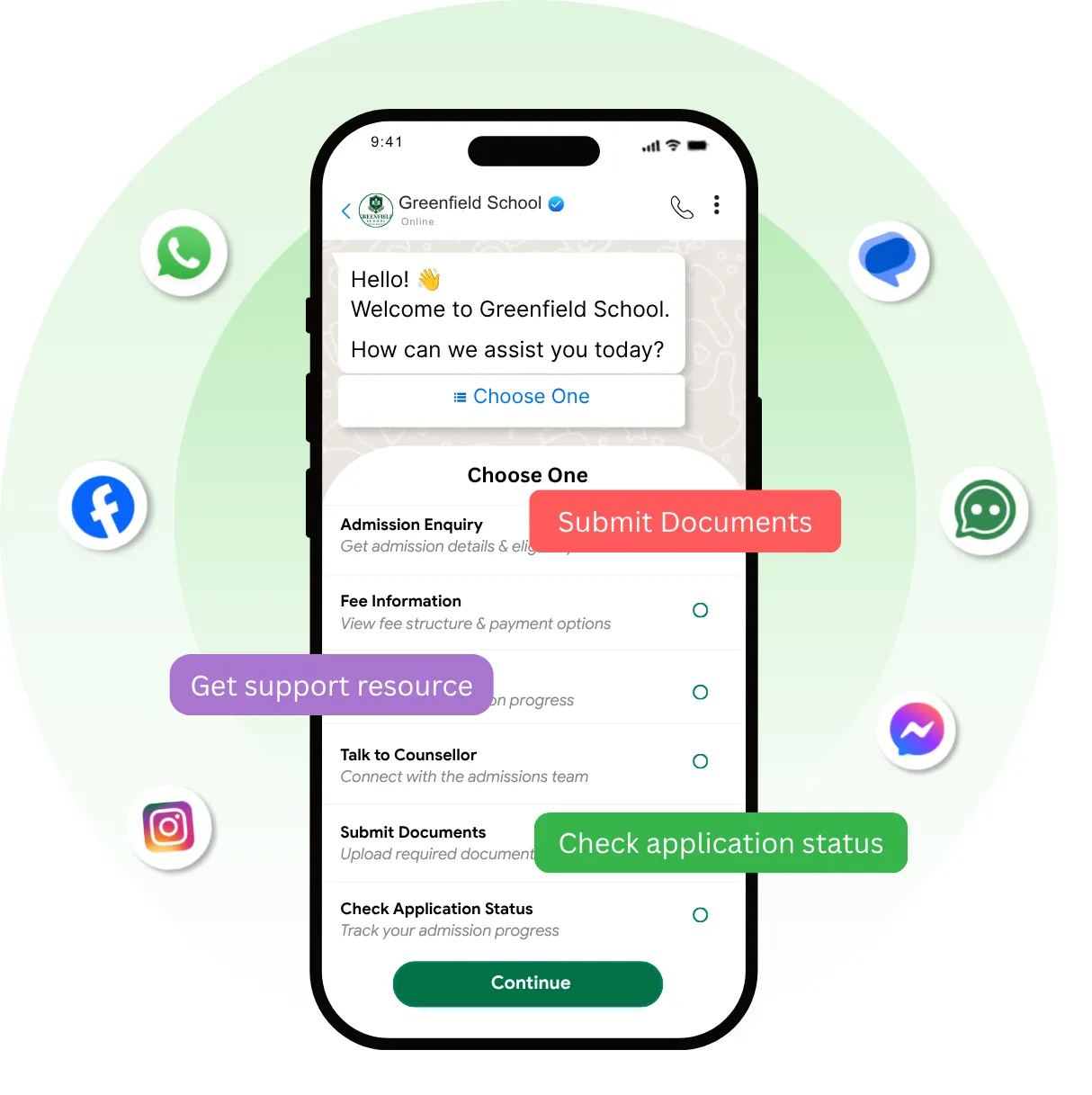
This is really the heart of the whole conversation — what can a school actually do with this once it's set up? Below are twelve real, practical use cases that schools are already running today.
1. Admission Enquiries Problem: Parents send admission enquiries through calls, walk-ins, and website forms, and half of them never get a proper follow-up. WhatsApp solution: Every enquiry — whether it comes from a Facebook ad, a website form, or a walk-in — gets logged and followed up automatically on WhatsApp. Example workflow: Parent fills a website form → WhatsApp sends an instant acknowledgment → admissions team gets notified. Example message: "Hi Mrs. Sharma, thank you for your interest in [School Name]. Our admissions counsellor will reach out to you shortly with details for Class 3 admission."
2. Admission Chatbot Problem: Answering the same admission questions — fees, class availability, timing — over and over wastes staff time. WhatsApp solution: A chatbot answers common questions instantly, any time of day. Example workflow: Parent messages "admission" → bot asks for the class → bot shares relevant details automatically. Example message: "Which class are you looking for? Reply with: 1) Nursery 2) Class 1-5 3) Class 6-8"
3. School Brochure and Prospectus Sharing Problem: Printing and handing out brochures is expensive and slow, especially for enquiries from far away. WhatsApp solution: The digital brochure gets sent instantly the moment a parent asks for it. Example workflow: Parent taps "Send Brochure" button → PDF is delivered in seconds. Example message: "Here's our latest school prospectus for the 2026-27 academic year. Let us know if you have any questions!"
4. Campus Visit Booking Problem: Coordinating campus visit timings over phone calls often leads to missed appointments. WhatsApp solution: Parents can pick an available slot directly through WhatsApp. Example workflow: Bot shares available time slots → parent selects one → confirmation is sent automatically. Example message: "Your campus visit is confirmed for Saturday, 10:00 AM. Our reception will guide you on arrival."
5. Application Reminders Problem: Parents start an admission form but don't finish it, and the school loses that lead. WhatsApp solution: A gentle reminder is sent automatically if the application isn't completed within a set number of days. Example workflow: Form left incomplete for 48 hours → automatic reminder is triggered. Example message: "Hi, we noticed your admission application is almost done. Would you like help completing it?"
6. Fee Reminders Problem: Manually calling or texting every parent about pending fees takes hours every month. WhatsApp solution: Reminders go out automatically based on the due date, without any manual effort. Example workflow: Fee due in 7 days → reminder sent → due tomorrow → second reminder → due today → final reminder with payment link. Example message: "Reminder: Term 2 fee of ₹15,000 for [Student Name] is due on 25th August. Pay now to avoid late charges."
7. Payment Confirmation Problem: Parents often aren't sure if their payment actually went through. WhatsApp solution: An instant confirmation message removes all that doubt. Example workflow: Payment received → confirmation and receipt sent within seconds. Example message: "Payment of ₹15,000 received for [Student Name]. Thank you! Your receipt is attached."
8. Attendance Alerts Problem: Parents want to know immediately if their child was absent, especially in younger grades. WhatsApp solution: An automatic alert is sent the moment attendance is marked. Example workflow: Teacher marks student absent in ERP → WhatsApp alert sent to parent within minutes. Example message: "Your child [Student Name] was marked absent today. If this is a mistake, please contact the school office."
9. Exam Timetable Notifications Problem: Printed timetables get lost, and parents forget exam dates. WhatsApp solution: The full exam schedule is shared directly on WhatsApp, and reminders go out before each exam. Example workflow: Timetable uploaded → automatically shared with every parent in that class. Example message: "Term 1 exam timetable for Class 6 is now available. Maths exam is on 5th September."
10. PTM Reminders Problem: Parent-Teacher Meeting attendance is often low simply because parents forget the date. WhatsApp solution: Automated reminders go out a few days before and on the morning of the PTM. Example workflow: PTM scheduled → reminder sent 3 days before → reminder sent on the day. Example message: "Reminder: PTM for Class 4 is tomorrow, 10 AM to 1 PM. We look forward to seeing you."
11. Holiday and Circular Notifications Problem: Printed circulars sometimes never reach the parent at all, especially with younger children. WhatsApp solution: Every circular is sent directly and instantly to every parent's phone. Example workflow: Circular uploaded by admin → sent to all parents in one click. Example message: "School will remain closed on 15th August for Independence Day. Classes resume as usual on 16th August."
12. Parent Support Problem: Parents have small questions all the time — uniform sizes, bus timing, lost items — and calling the office repeatedly is frustrating for both sides. WhatsApp solution: A support chat handles routine queries, and only complex ones go to a staff member. Example workflow: Parent asks a question → chatbot answers if it's a common one → escalates to staff if needed. Example message: "Our school bus for Route 4 usually arrives between 7:45 and 8:00 AM."
WhatsApp Chatbot for School Admissions
Admission season is usually the busiest and most chaotic time for any school office, and this is exactly where a chatbot proves its worth.
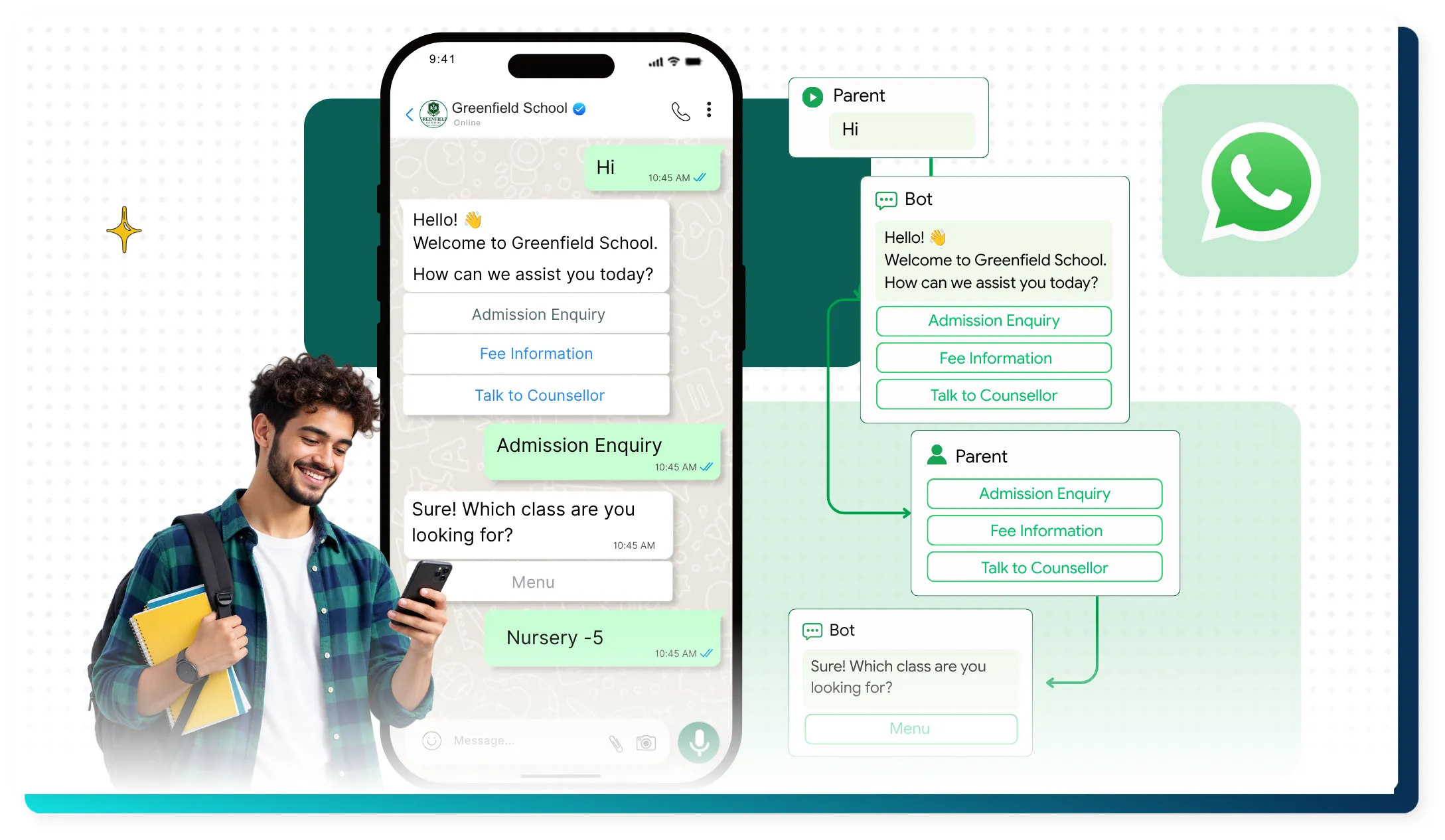
Here's how a real conversation typically flows:
Parent: I want admission information.
Bot: Sure! Which class are you looking for?
Nursery
Class 1-5
Class 6-8
Class 9-10
Class 11-12
Parent: Class 1-5
Bot: Great, which location or branch are you interested in?
Parent: [selects location]
Bot: Are you looking for CBSE, ICSE, or State Board?
Parent: CBSE
Bot: Here's our fee structure for CBSE, Class 1-5. Would you like our brochure as well?
Parent: Yes please.
Bot: Here's the brochure. Would you like to schedule a campus visit?
Parent: Yes.
Bot: Here are our available slots this week...
Once the parent selects a slot, or once the conversation reaches a certain point, the chatbot automatically passes this lead to the admissions counsellor along with everything the parent has shared so far — class, board, location preference, and contact details. The counsellor doesn't start from zero; they already know exactly what the parent needs, which makes the follow-up call far more personal and much faster.
This single flow can genuinely cut admission enquiry response time from hours down to seconds.
WhatsApp API for School Fee Reminders
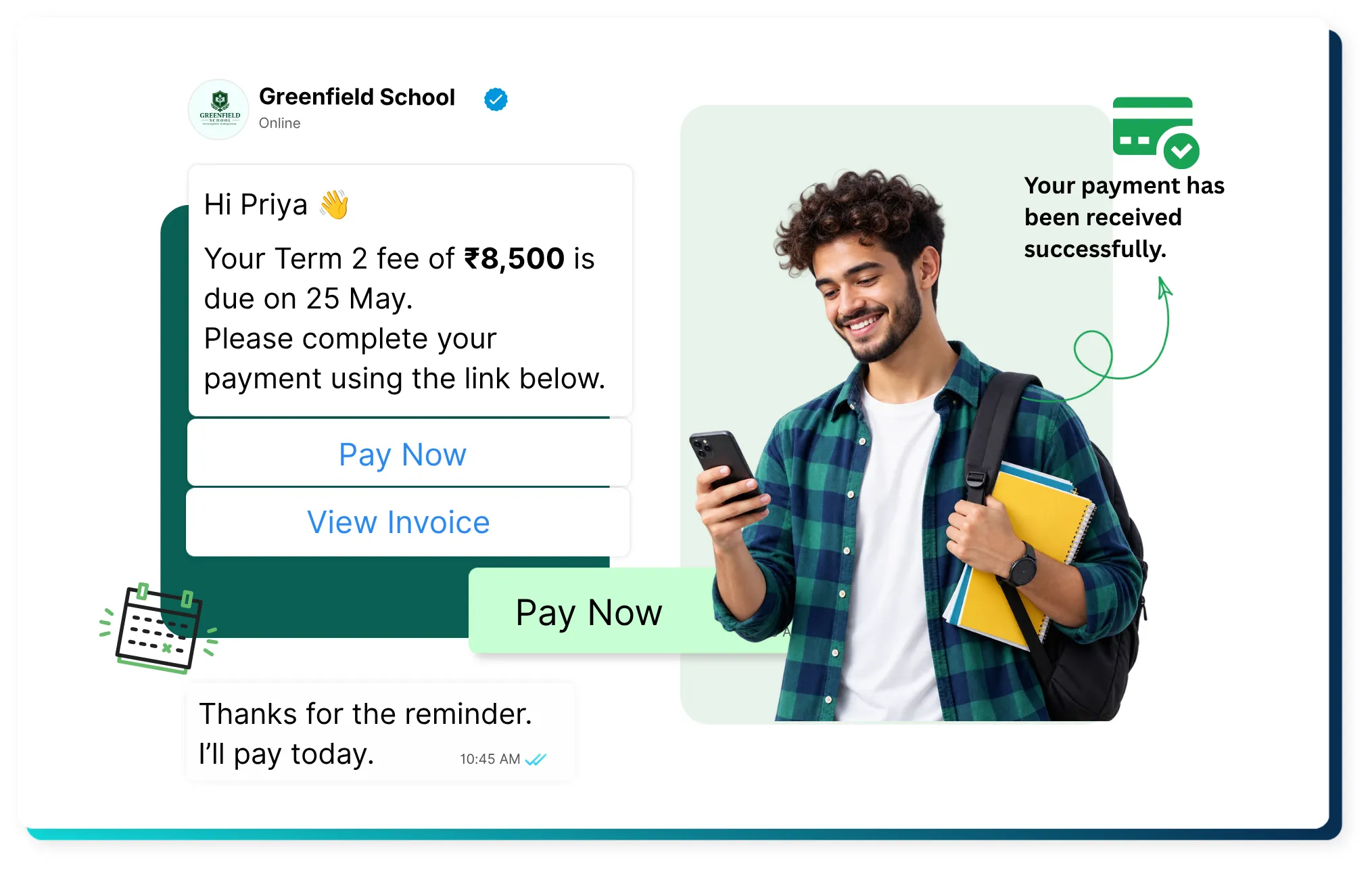
Fee collection is probably the single biggest headache for school accounts teams, and using WhatsApp for School can be one of the clearest ways to simplify fee reminders, payment updates, and parent communication.
Here's a typical automated fee reminder journey:
Fee due in 7 days → first friendly reminder is sent ↓ Fee due tomorrow → second reminder is sent ↓ Due today → final reminder with a direct payment link ↓ Payment completed → instant confirmation ↓ Receipt → sent automatically for the parent's records
A few sample templates schools commonly use:
7-day reminder: "Hi [Parent Name], this is a reminder that the Term 2 fee of ₹[Amount] for [Student Name] is due on [Date]. You can pay directly using the link below."
Due-today reminder: "Fee for [Student Name] is due today. Please complete the payment at your earliest convenience to avoid a late fee."
Post-payment confirmation: "Thank you! We've received ₹[Amount] for [Student Name]. Your official receipt is attached below."
What makes this genuinely useful, beyond just "sending reminders," is that everything happens without a single staff member manually tracking who has paid and who hasn't. The system already knows, because it's pulling that information straight from the school's fee records.
There's also a quieter benefit here that schools don't always think about upfront — late fee disputes go down significantly. When a parent has three separate reminders sitting in their WhatsApp chat, with timestamps, it becomes very hard to say "nobody told me." This alone has saved many accounts teams from awkward conversations during parent meetings.
WhatsApp API for Parent Communication
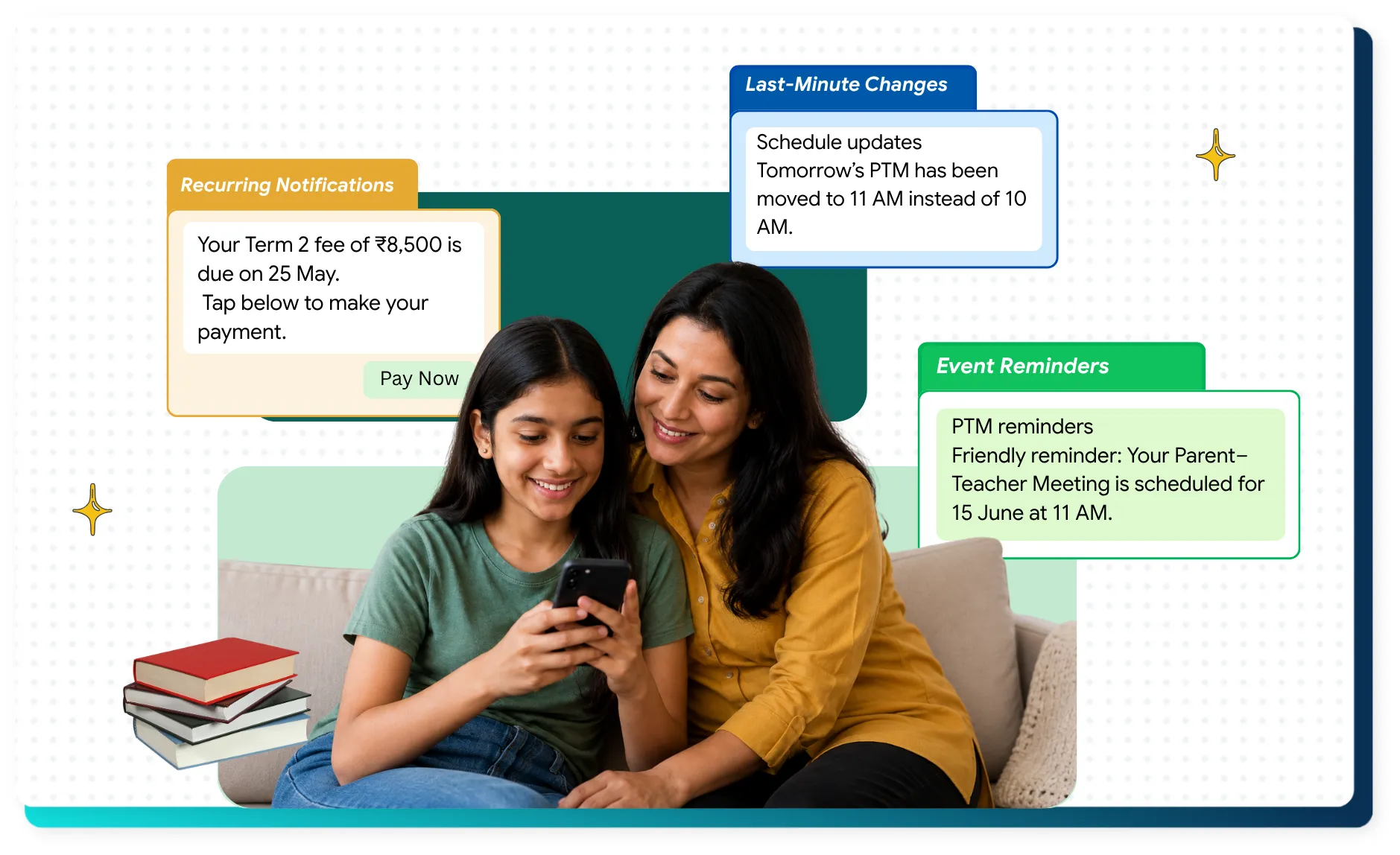
Beyond admissions and fees, day-to-day parent communication is where WhatsApp API quietly becomes part of a school's daily routine.
Attendance — instant alerts the moment a child is marked absent.
Homework — daily or weekly homework updates sent directly to parents.
Exams — timetables, syllabus reminders, and result notifications.
PTM — scheduling and reminders, with the option to confirm attendance.
Circulars — every school notice delivered directly, without depending on a child carrying home a paper.
Events — annual day, sports day, and other event updates with RSVP options.
Transport alerts — bus delays, route changes, or driver contact updates.
Emergency notifications — early closures, weather alerts, or urgent announcements sent instantly to every parent at once.
The real value here isn't any single feature — it's that all of this runs through one channel parents already check multiple times a day, instead of being spread across SMS, email, printed notices, and phone calls.
WhatsApp API + School ERP/LMS
For schools that already use an ERP or learning management system, connecting it with WhatsApp API is where things get genuinely powerful.
Here's the basic architecture:
School ERP ↓ WhatsApp API Platform (like Anantya.ai) ↓ WhatsApp ↓ Parent/Student
In simple terms, the ERP holds all the data — attendance, fees, exam schedules — and the WhatsApp API platform acts as the messenger that delivers this data to parents the moment something changes.
A few real examples of how this plays out:
ERP marks a student absent → WhatsApp notification is triggered automatically to that parent.
ERP flags an unpaid fee → WhatsApp reminder goes out without any manual action.
ERP updates the exam schedule → every affected parent receives the update instantly.
This integration is what separates a basic "bulk messaging tool" from a real communication system. Once it's set up, the school's staff barely have to think about sending messages at all — the system handles it based on what's already happening in the ERP.
WhatsApp API vs SMS for Schools
Many schools still rely on SMS for notifications, mostly out of habit. But when you actually compare the two side by side, the gap becomes clear.
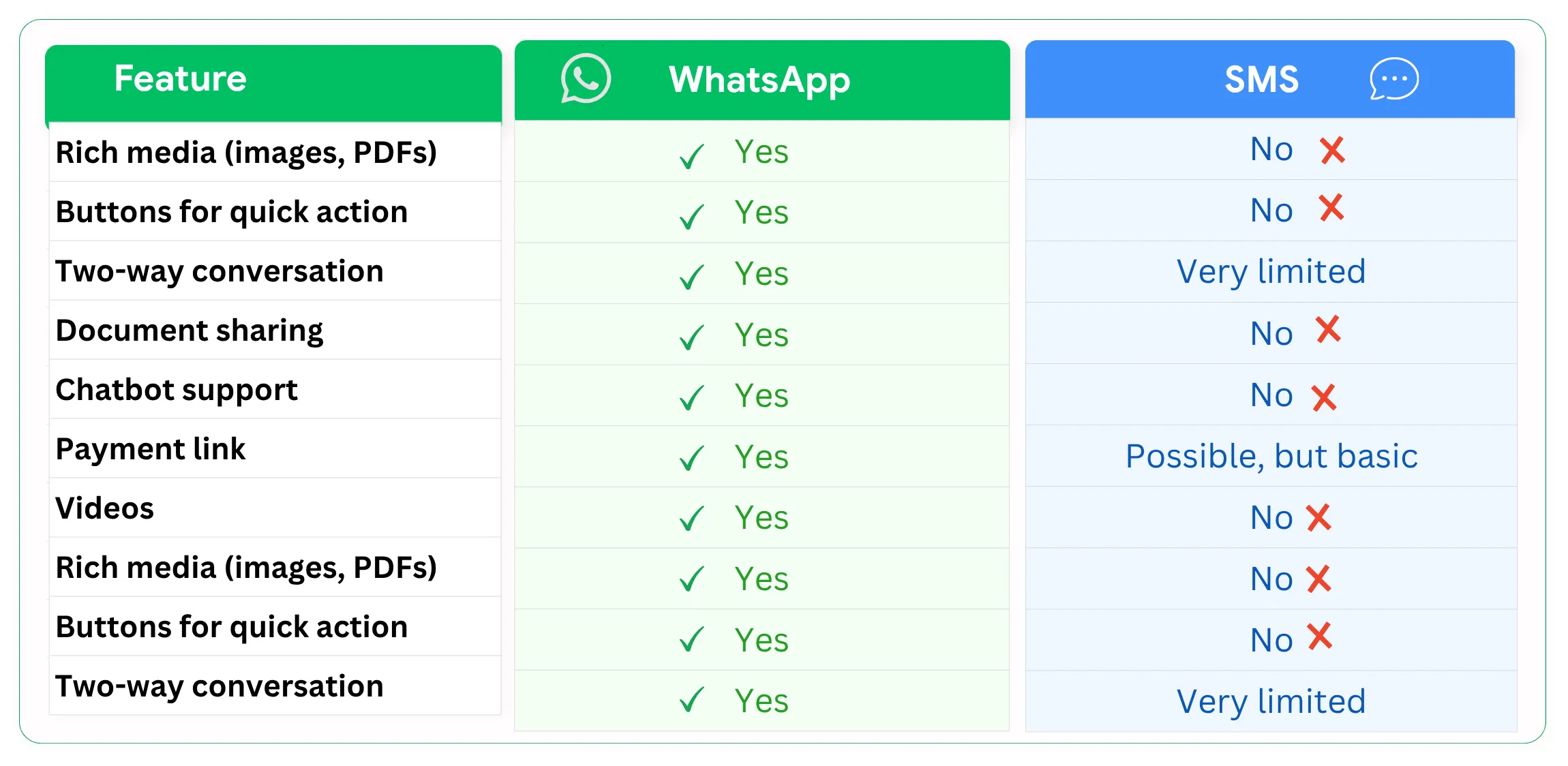
When it comes to school communication, WhatsApp offers more interactive features than traditional SMS. Schools can share images, PDFs, videos, and other documents directly with parents. WhatsApp also supports interactive buttons, payment links, chatbots, and two-way conversations, making it easier for parents to respond or take action.
SMS, on the other hand, is mainly designed for sending short text messages. It does not support rich media or interactive features in the same way WhatsApp does. However, SMS remains useful because it does not require an internet connection and can reach parents who may have limited access to mobile data.
For regular school communication such as admission information, fee reminders, brochures, payment updates, attendance alerts, and parent queries, WhatsApp can provide a more engaging and convenient experience. Schools can also combine WhatsApp and SMS when needed to ensure important notifications reach parents through the most suitable channel.
WhatsApp Message Templates for Schools
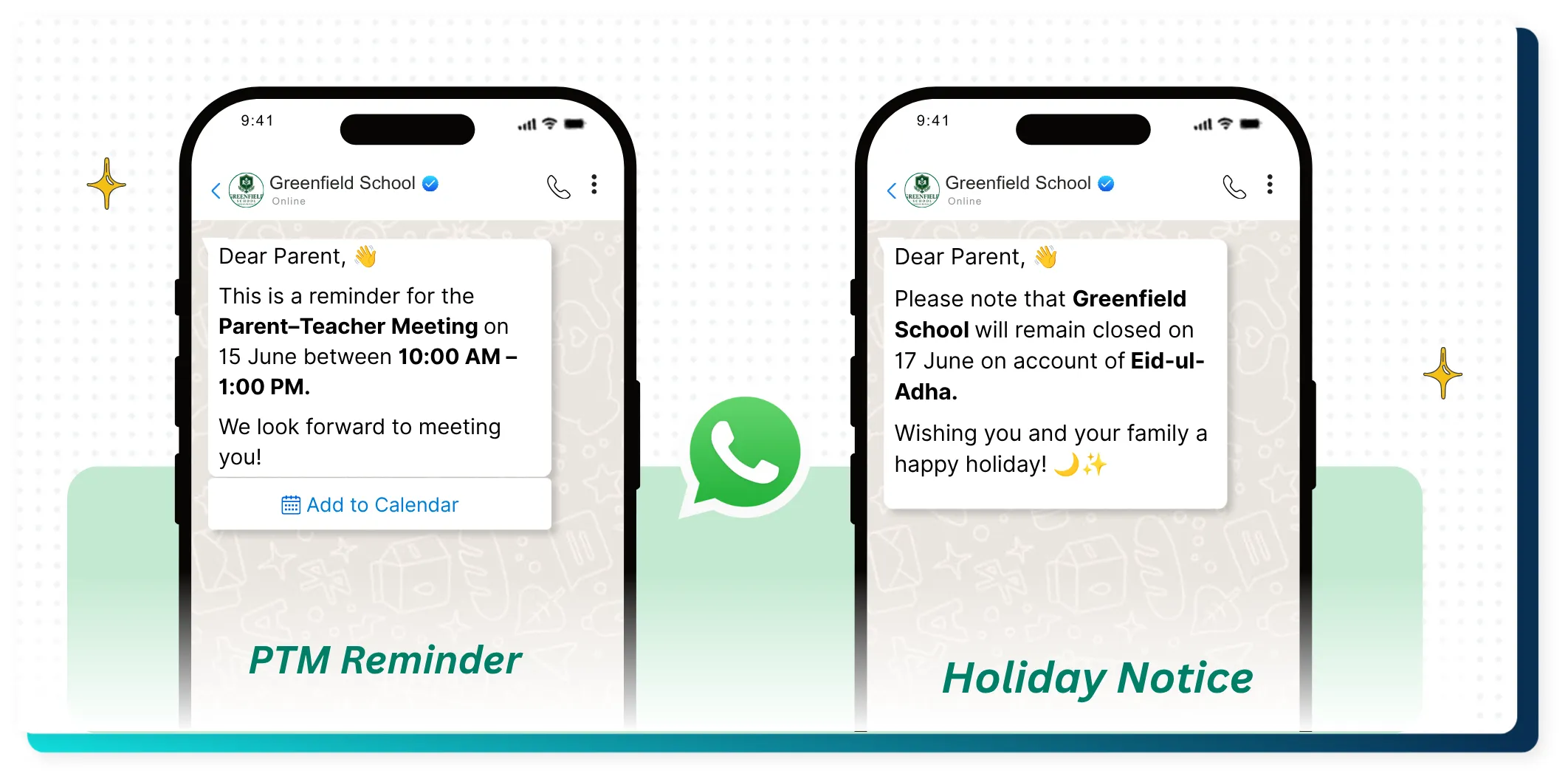
Since WhatsApp requires businesses to use pre-approved templates for most notification-type messages, it helps to know what these actually look like in practice. Here are a few examples schools commonly rely on:
Admission enquiry acknowledgment: "Thank you for your interest in [School Name]. Our team will contact you within 24 hours."
Fee reminder: "Fee of ₹[Amount] for [Student Name] is due on [Date]. Pay now via the link below."
Attendance alert: "[Student Name] was marked absent today, [Date]. Contact the school office if this needs correction."
PTM reminder: "PTM for [Class] is scheduled on [Date] at [Time]. We look forward to seeing you there."
Exam notification: "[Subject] exam for [Class] is scheduled on [Date]. Best of luck to your child!"
Holiday notice: "School will remain closed on [Date] for [Reason]. Regular classes resume on [Date]."
Payment confirmation: "We've received your payment of ₹[Amount] for [Student Name]. Thank you!"
Having a solid set of ready templates means the school never has to scramble to write a message from scratch during a busy week.
How to Implement WhatsApp Business API for a School
Setting this up isn't overly technical, but it does involve a few clear steps:
Select an API or BSP provider — Choose a platform that offers WhatsApp Business API access along with the features a school actually needs, like chatbots and ERP integration.
Complete business verification — This is a one-time process where the school gets verified with Meta as an official business.
Set up the WhatsApp number — Usually a landline or dedicated number that becomes the school's official WhatsApp identity.
Create message templates — Get common templates approved in advance so they're ready to use.
Integrate with ERP/LMS — Connect the school's existing student data system so messages can trigger automatically.
Set up the chatbot — Build out flows for admissions, fee queries, or general support.
Assign user and team access — Give the right departments access to the right conversations.
Run a testing phase — Send test messages internally before going live with parents.
Launch — Roll it out to actual parents and students.
Track analytics — Monitor delivery rates, response times, and engagement to keep improving.
Most schools can go from decision to full launch within a couple of weeks, depending on how much ERP integration work is involved. It's worth mentioning that the biggest delays usually don't come from the technical setup itself — they come from internal decisions, like who should own the WhatsApp number, which templates need approval from the principal's office, and how staff roles should be divided. Sorting these out early, before the technical work even begins, tends to make the whole rollout smoother.
A smart approach many schools take is to start small. Instead of switching everything to WhatsApp on day one, begin with just one use case — fee reminders, for instance — let it run for a few weeks, and once the staff and parents are comfortable with it, gradually add admissions, attendance, and the rest. This avoids overwhelming both the school staff and the parents with too much change at once.
WhatsApp API Cost for Schools
It's tempting to look for a single fixed number here, but honestly, giving one wouldn't be accurate, since pricing structures change and vary by provider. Instead, it helps to understand what actually makes up the cost:
Meta messaging charges — the per-message fee set by Meta itself, which varies by country and message category.
Provider or platform charges — the fee your WhatsApp API partner charges for the platform, dashboard, and support.
Integration cost — any setup fee for connecting your ERP or LMS with the WhatsApp system.
Chatbot and automation setup — cost associated with building and maintaining automated flows.
Additional services — things like advanced analytics, dedicated support, or extra team seats.
Since Meta's pricing does get revised from time to time, it's always worth checking their current rates directly, or asking your chosen provider for an updated cost breakdown before making a final decision.
How to Choose a WhatsApp API Provider for a School
With so many providers out there, it helps to have a simple checklist in hand before making a decision:
Is it an official WhatsApp Business API provider, not a third-party workaround?
Does it offer easy template management and quick approvals?
Is there proper chatbot support built for admissions and parent queries?
Can it integrate with your school's ERP or LMS?
Does it support payment integration for fee collection?
Is there a multi-agent inbox so different departments can manage their own conversations?
Does it provide clear analytics on delivery and engagement?
How strong is the automation capability overall?
What kind of security measures are in place for student and parent data?
Can the platform scale as your school grows?
What does their customer support actually look like once you're a paying customer?
Getting this right at the start saves a lot of frustration later, especially once the system becomes a core part of how the school runs day to day.
A Final Thought
None of this is about replacing the personal touch a school offers — the warm conversation at the reception desk, the teacher who knows every child's name, the counsellor who patiently answers a nervous parent's questions. WhatsApp Business API isn't trying to replace any of that. It's simply removing the repetitive, manual parts of communication so that staff have more time and energy for the parts that actually need a human touch.
A school that adopts this thoughtfully — starting small, choosing the right provider, and rolling it out step by step — usually finds that parents respond better, staff feel less stretched, and the whole admission-to-graduation journey feels a little less chaotic. And in a school environment, where every single day already has enough going on, that kind of calm is worth a lot.