


Client: New Look Medical Center Khabisi
Solution Provider: Anantya.ai
Industry: Healthcare
Platform: Anantya WhatsApp Business Platform + Odoo HIS
Integration: Odoo HIS JSON-RPC APIs
Solution Category: Healthcare Automation + Appointment Booking
1. Business Challenge
New Look Medical Center Khabisi wanted to simplify the process of booking Dermatology appointments for patients.
The traditional appointment process required patients to coordinate with the hospital to identify themselves, find the appropriate doctor, check availability, and confirm an appointment. This could result in additional effort for both patients and hospital staff.
The hospital also needed to handle different patient scenarios, including:
Existing patients booking appointments.
New patients who are not yet registered.
Multiple family members using the same mobile number.
Doctors having dynamically changing appointment availability.
Appointment slots become unavailable while a patient is completing the booking.
Need for real-time appointment confirmation in the hospital system.
The key requirement was to provide patients with a simple, conversational appointment booking experience without requiring them to manually coordinate with the hospital.
2. Suggested Solution
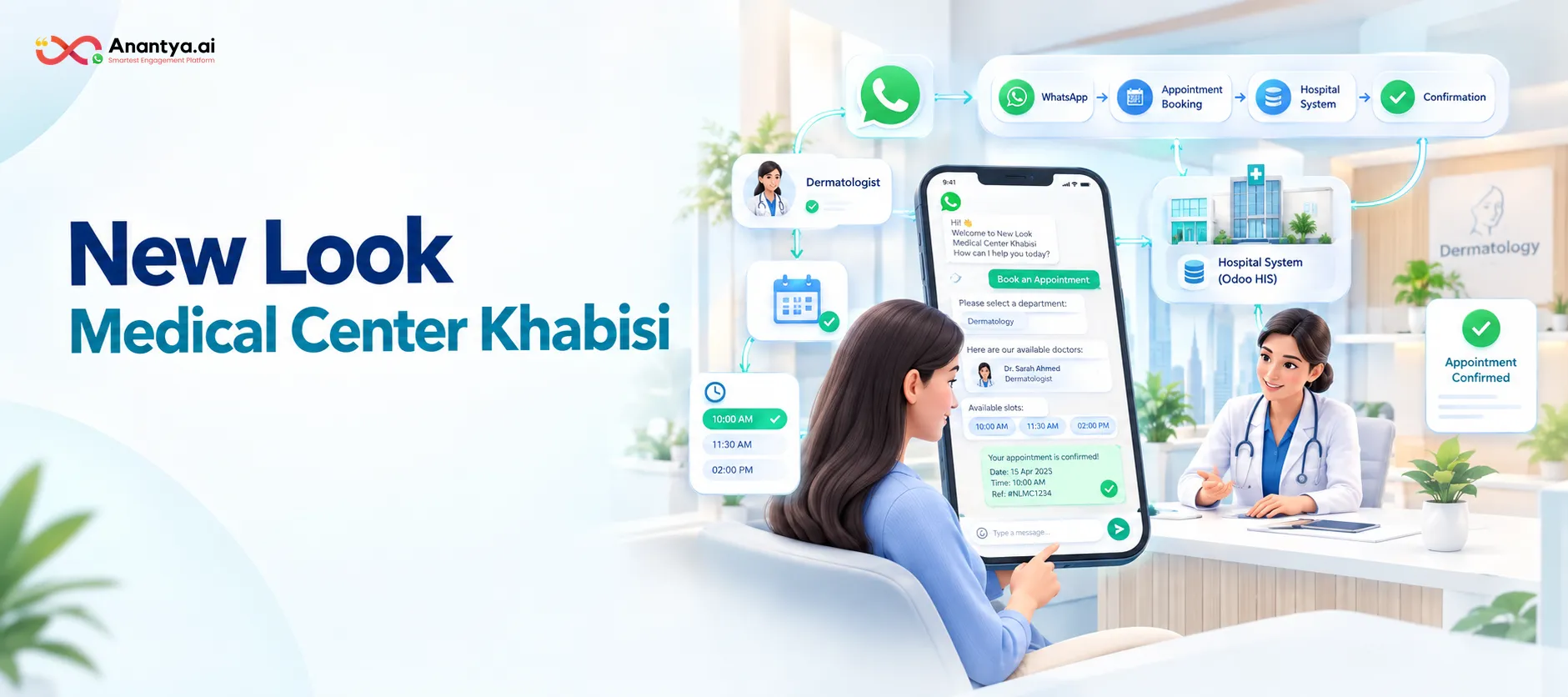
Anantya implemented a WhatsApp-based appointment booking chatbot integrated with the hospital's Odoo HIS.
The solution connects the WhatsApp chatbot with Odoo through JSON-RPC APIs to dynamically:
Identify patients using their mobile number.
Register new patients during the booking journey.
Identify multiple family members linked to one mobile number.
Fetch available Dermatology doctors.
Fetch real-time appointment slots.
Book appointments directly in Odoo HIS.
Confirm successful bookings through WhatsApp.
Handle unavailable slots through an automated retry mechanism.
This creates an end-to-end digital appointment journey:
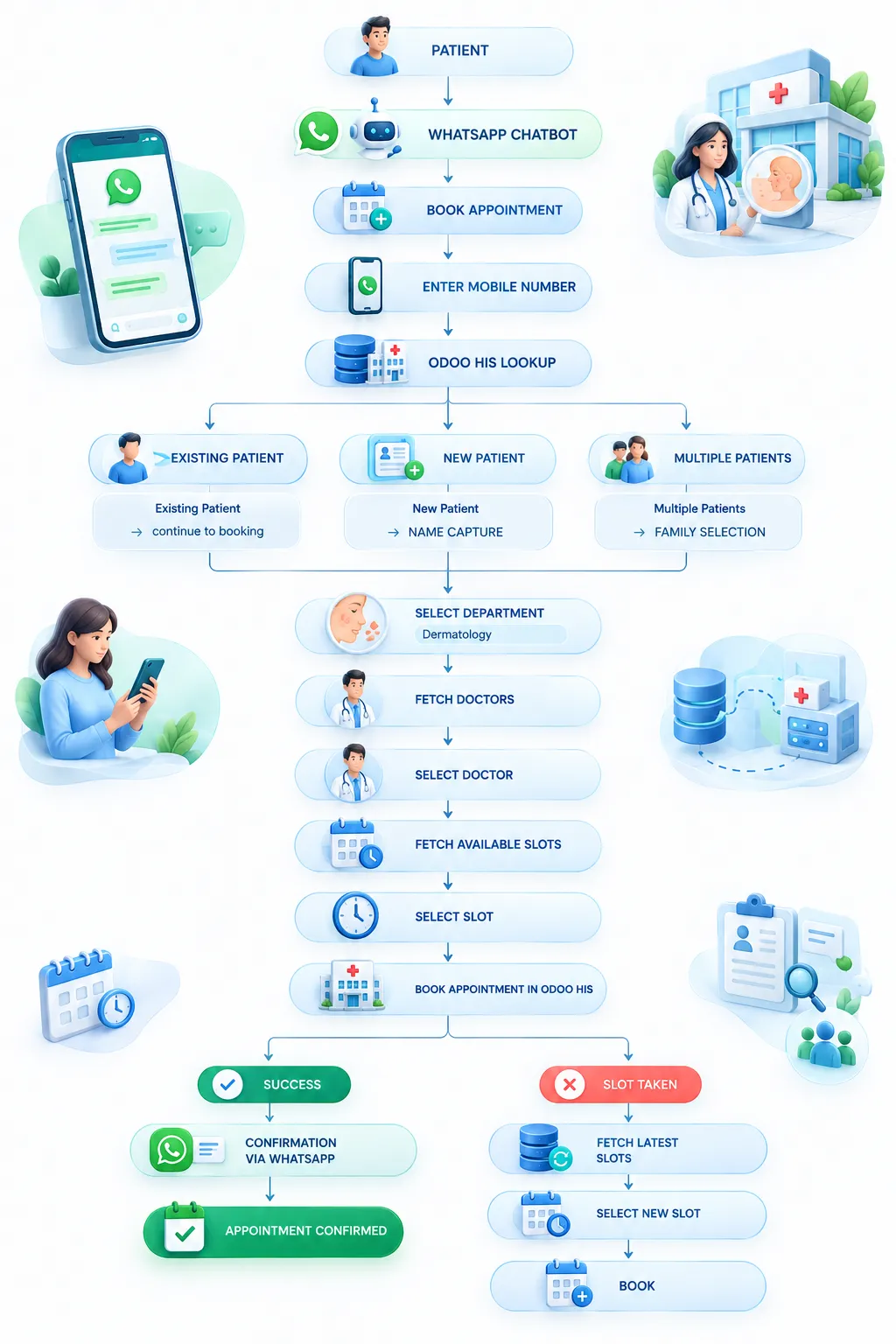
WhatsApp → Patient Identification → Doctor Selection → Slot Selection → Odoo Booking → WhatsApp Confirmation
3. Implemented Customer Journey
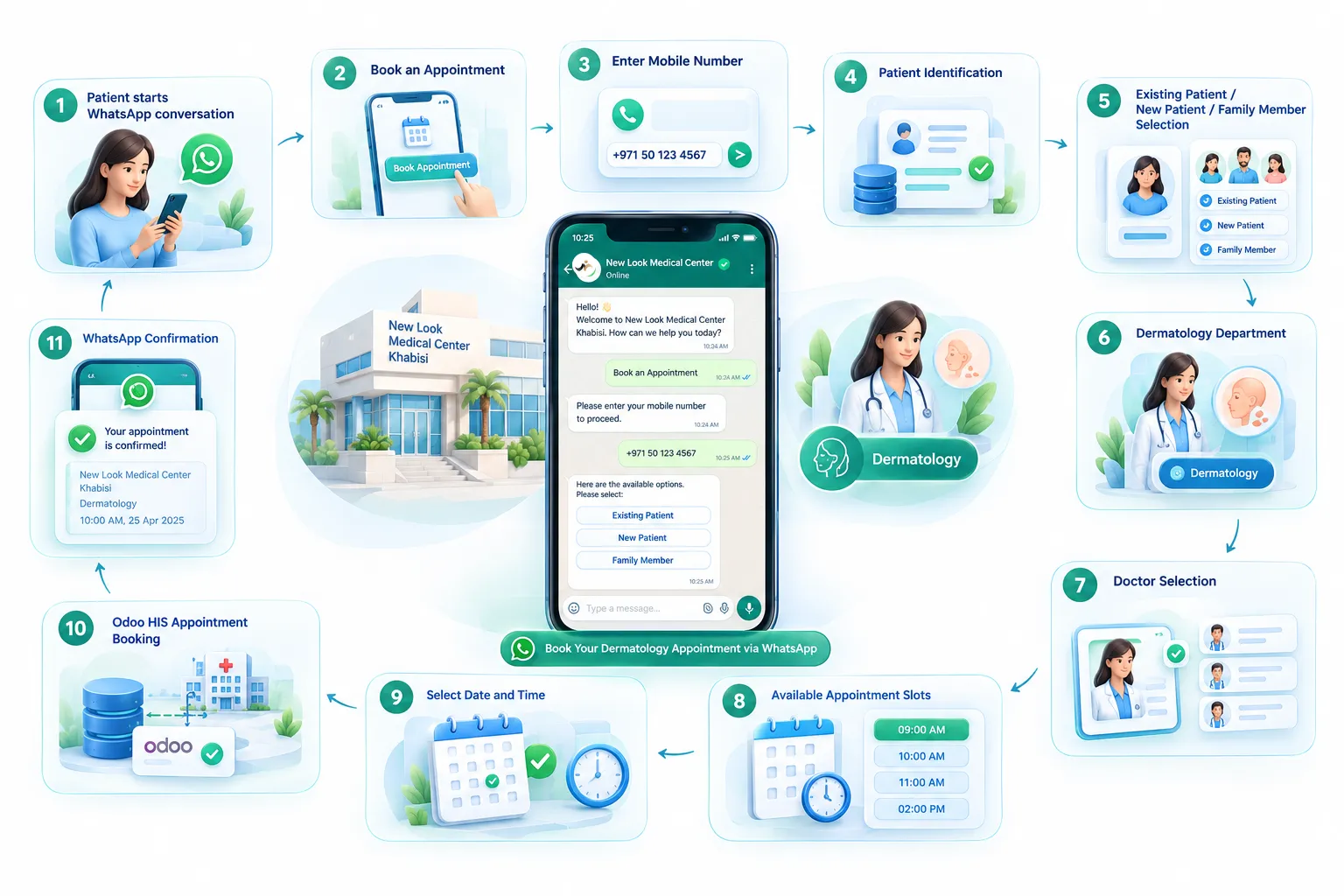
Step 1 – Appointment Initiation
The patient starts a conversation with the hospital's WhatsApp chatbot.
The chatbot presents the option:
Book an Appointment
Once selected, the patient is asked to provide their mobile number.
Step 2 – Patient Identification
The mobile number is sent to the Odoo HIS through the Patient Lookup API.
The system identifies the patient's status and automatically routes them to the appropriate journey.
Three possible scenarios:
Existing Patient
The patient's existing record is identified and the booking journey continues.
New Patient
If no patient record is found, the chatbot collects:
First Name
Last Name
These details are used while creating the appointment.
Multiple Patients / Family Members
If multiple patient records are associated with the same mobile number, the chatbot displays the available patient names.
The user selects the required family member, and the selected patient record is used for appointment booking.
4. Doctor Selection
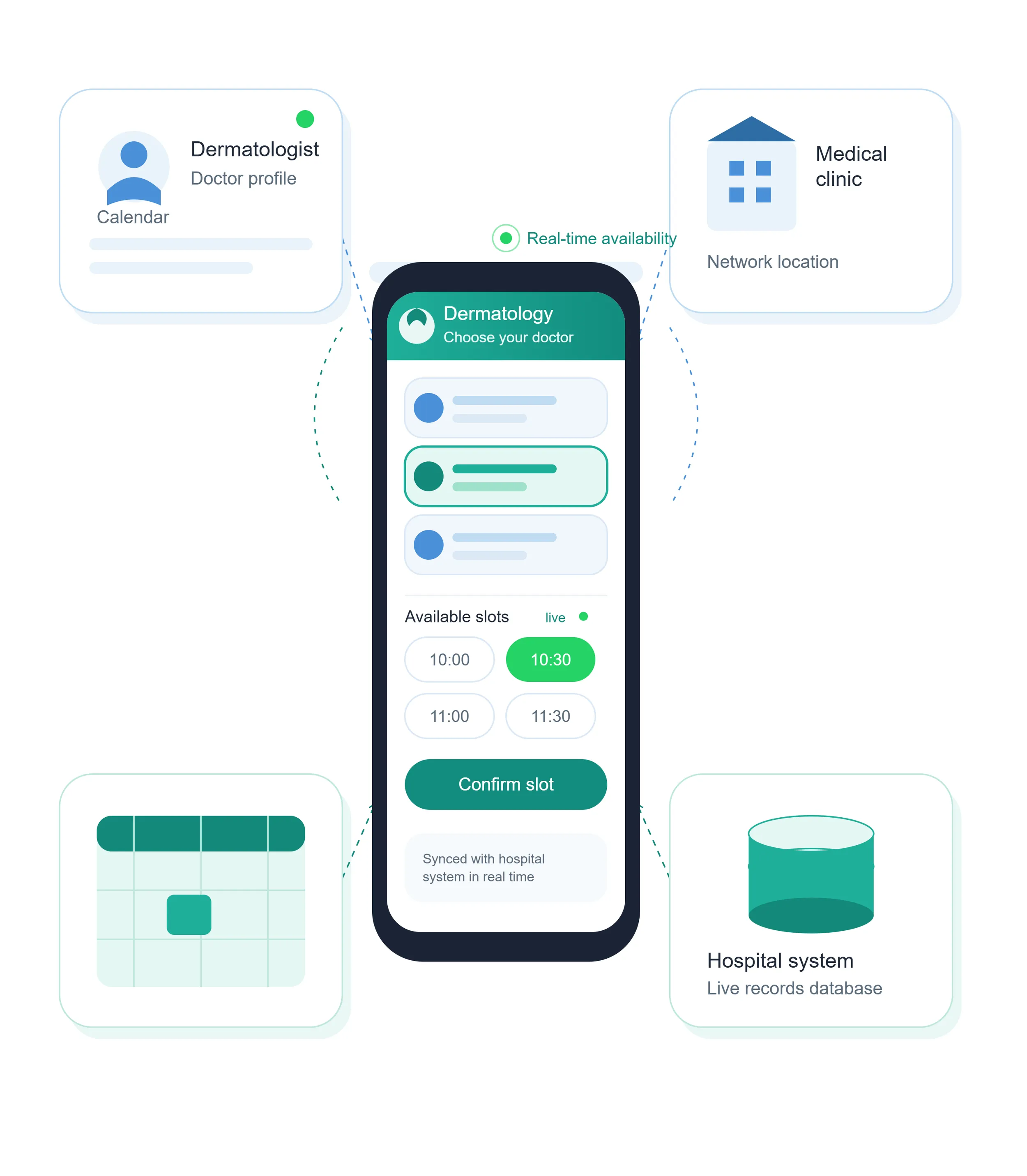
Once the patient has been identified, the chatbot retrieves the available Dermatology doctors from the Odoo HIS.
The doctor list is dynamically fetched rather than being maintained manually within the chatbot.
The patient selects their preferred doctor directly from WhatsApp.
This ensures that the chatbot reflects the doctor information available in the hospital system.
5. Real-Time Slot Selection
After selecting a doctor, the chatbot requests the doctor's available appointment slots from Odoo HIS.
The available slots are displayed to the patient within WhatsApp.
The patient can then:
Review available slots.
Select a preferred date/time.
Confirm the appointment.
This eliminates the need for patients to call the hospital to check doctor availability.
6. Appointment Booking
Once the patient selects a slot, the chatbot sends the booking request to Odoo HIS.
For existing patients, the booking is mapped using the patient's existing Person ID.
For new patients, the booking request uses the newly captured patient information along with the selected doctor and slot.
The appointment is created directly in the hospital system.
7. Automated Booking Confirmation
Once Odoo successfully creates the appointment, the chatbot sends an immediate WhatsApp confirmation.
The confirmation includes:
Clinic Name
Appointment Date
Appointment Time
Booking Reference
Example
Your appointment is confirmed.
Clinic: New Look Medical Center Khabisi
Date: [Appointment Date]
Time: [Appointment Time]
Reference: [Booking Reference]
This gives the patient an immediate confirmation without requiring a separate call or manual confirmation from hospital staff.
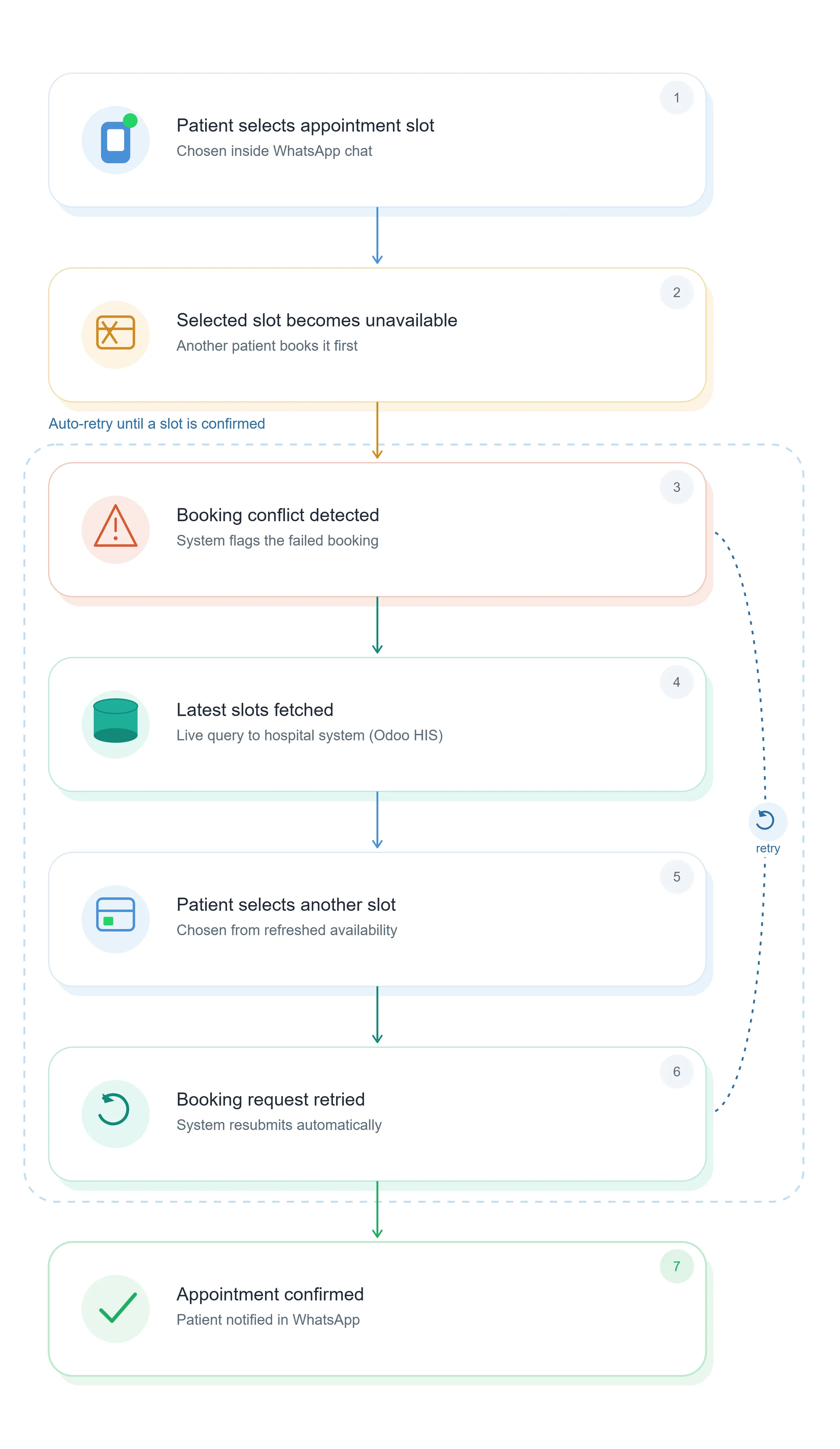
8. Automated Slot Conflict Handling
Appointment availability can change while multiple patients are trying to book the same slot.
To handle this scenario, a retry mechanism was implemented.
If the selected slot becomes unavailable during the booking process:
The chatbot identifies the booking failure.
The latest available slots are fetched from Odoo.
The patient is shown the updated availability.
The patient selects another slot.
The booking request is retried.
The process continues until a successful appointment is created.
This reduces booking failures and prevents patients from being stuck because of outdated slot availability.
9. End-to-End Integration Flow
10. Key Business Scenarios
Scenario 1 – Existing Patient Appointment
An existing patient enters their mobile number.
The system identifies their patient record, displays available Dermatology doctors and appointment slots, and books the selected appointment directly in Odoo.
Benefit: The patient does not need to provide their details repeatedly.
Scenario 2 – New Patient Appointment
A new patient enters their mobile number.
Since no existing record is found, the chatbot collects the patient's first and last name and continues with doctor and slot selection.
Benefit: New patients can initiate their appointment journey directly through WhatsApp.
Scenario 3 – Family Members Sharing a Mobile Number
Multiple family members may be associated with the same mobile number.
The chatbot displays the available patient records and allows the user to select the appropriate family member before continuing.
Benefit: The correct patient record is used for the appointment, reducing identification errors.
Scenario 4 – Dynamic Doctor Availability
The doctor list is retrieved directly from Odoo HIS.
Patients therefore select from the doctors available in the hospital system rather than relying on a manually maintained chatbot list.
Benefit: Reduces outdated information and improves booking accuracy.
Scenario 5 – Real-Time Appointment Slot Booking
The chatbot retrieves available slots for the selected doctor and allows the patient to choose directly from WhatsApp.
Benefit: Patients can complete the booking without calling the hospital to check availability.
Scenario 6 – Slot Conflict During Booking
A patient selects a slot that becomes unavailable before the booking is completed.
The system automatically retrieves the latest slots and allows the patient to select another available option.
Benefit: Provides a smoother booking experience and reduces failed appointment attempts.
11. Business Benefits
For New Look Medical Center Khabisi
Reduced Appointment Handling Effort
Patients can complete the appointment booking process themselves through WhatsApp, reducing dependency on reception staff.
Automated Patient Identification
The integration automatically identifies existing patients using their mobile number.
Better Handling of Family Accounts
Multiple patients associated with the same mobile number can be individually identified and selected.
Real-Time Availability
Doctor and slot information is fetched dynamically from Odoo HIS.
Reduced Booking Errors
The system validates patient information and handles unavailable slots through an automated retry mechanism.
Improved Operational Efficiency
Hospital staff can focus on patient care and complex queries instead of routine appointment booking.
Centralized Hospital Records
Appointments are created directly in Odoo HIS, ensuring the hospital's central system remains the source of appointment data.
12. Benefits for Patients
Book appointments from WhatsApp.
No need to call the hospital for routine bookings.
Quick patient identification.
Easy selection of doctor and appointment slot.
Support for family members using the same mobile number.
Immediate appointment confirmation.
Automatic handling when a selected slot becomes unavailable.
Simple and familiar WhatsApp-based experience.
13. Business Impact
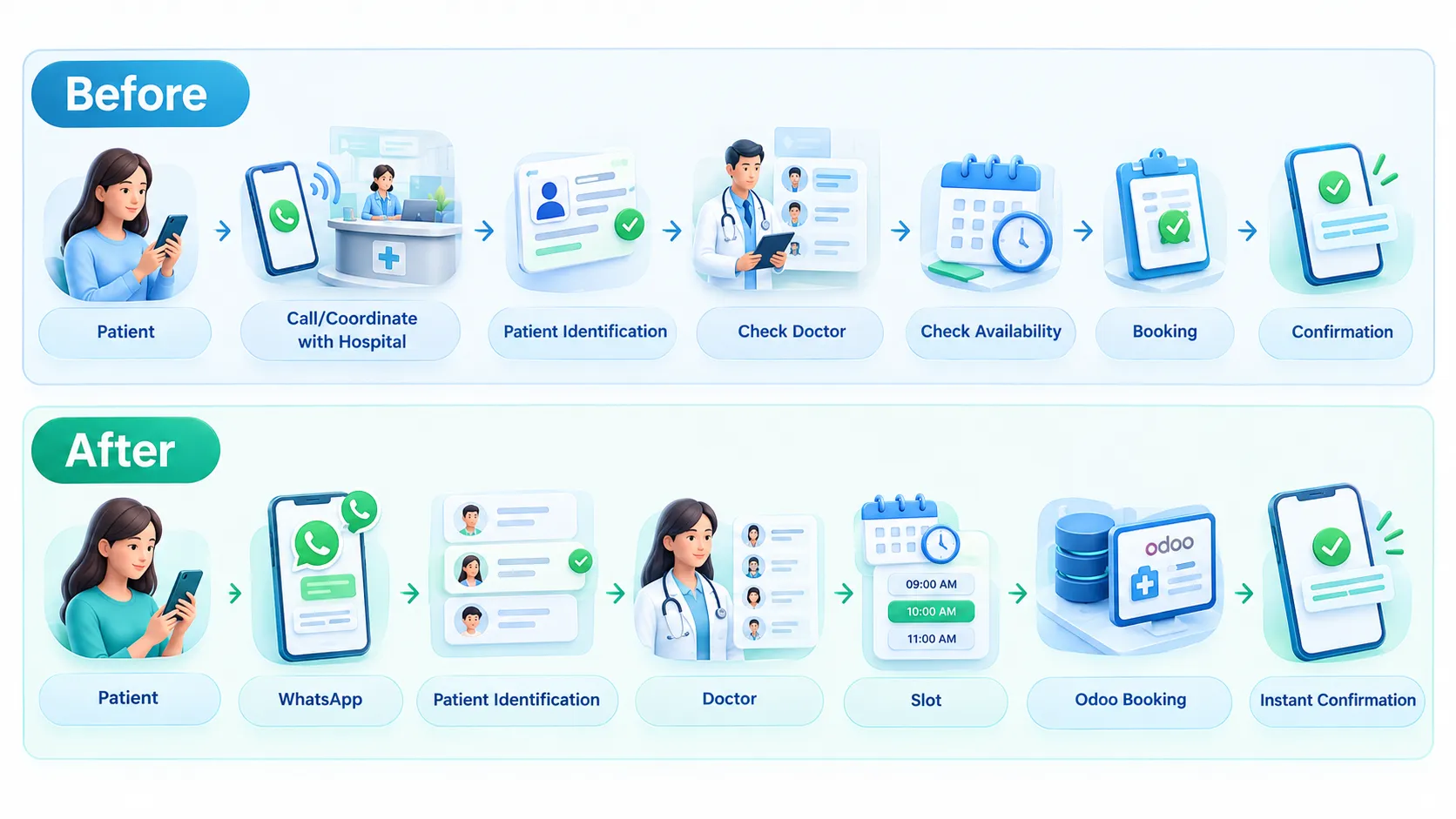
The integration transforms appointment booking from a staff-assisted process into a self-service digital journey.
This enables the hospital to provide a faster and more convenient booking experience while reducing repetitive operational work.
14. Why This Use Case Is Valuable for Other Healthcare Businesses
The New Look Medical Center Khabisi implementation demonstrates how Anantya can integrate WhatsApp with a hospital's existing HIS/appointment system rather than requiring the healthcare provider to replace its backend system.
The same model can be adapted for:
Hospitals
Medical centers
Clinics
Specialist clinics
Dental clinics
Dermatology centers
Diagnostic centers
Multi-speciality healthcare providers
Appointment-driven healthcare businesses
Potential extensions can include:
Appointment reminders
Appointment rescheduling
Appointment cancellation
Doctor-specific journeys
Multi-department booking
Patient information retrieval
Prescription/report notifications
Follow-up appointment reminders
Payment integration.
The Value Proposition
From “Call the hospital to book an appointment” to “Book your appointment directly on WhatsApp.”
This helps healthcare businesses deliver a 24×7, self-service appointment experience while reducing repetitive workload for their front-desk and appointment teams.