




Table of Contents:
- WhatsApp Business in MarTech: A Complete Guide to Automation, APIs, and Bulk Broadcasting
- WhatsApp Business API & Advanced Features
- WhatsApp Automation & Scheduling
- Bulk Broadcast & WhatsApp Marketing
- Click to WhatsApp Ads (Lead Generation Strategy)
- Send Message Without Saving Number
- WhatsApp Chatbot for Business Automation
- WhatsApp Tools for Automation
- WhatsApp Features You Should Know
- WhatsApp Links & Direct Messaging
- WhatsApp Business Profile Setup: First Impressions That Build Trust
- Backup & Security
- WhatsApp Shop & Business Use Cases
- WhatsApp Analytics & Performance Tracking
- Conclusion
- FAQs
WhatsApp Business in MarTech: A Complete Guide to Automation, APIs, and Bulk Broadcasting
MarTech stacks have gotten complicated fast.
CRMs, email automation, chatbots~ businesses are adding tools every quarter trying to solve one core problem: how do you actually reach customers in a way they respond to?
And then there's WhatsApp. Already sitting on every customer's phone. Already opened dozens of times a day. Already trusted the way no email newsletter ever will be.
The gap between where customer attention lives and where most MarTech budgets go, that's the conversation this guide is about.
WhatsApp Business has quietly become one of the most powerful layers in a modern marketing technology stack. Not because it's new. Because it's where the customer already is.
Think about your own habits. You probably open a WhatsApp message within minutes, sometimes seconds. An email from a brand? That can wait until tomorrow. Or next week. Or never.
That gap in attention is a business decision waiting to be made.
Brands that have figured this out aren't just using WhatsApp to answer customer queries. They're running full WhatsApp campaigns broadcasting offers to segmented lists, automating follow-up sequences, collecting payments, recovering abandoned carts, and routing high-intent leads directly into their sales pipeline.
All of it through one channel the customer checks without being reminded.
But here's where most businesses are still leaving money on the table.
They use the basic version. Manual replies. Copy-pasted messages. A business profile with the logo and not much else.
They haven't touched WhatsApp Business API, the infrastructure that makes bulk broadcasting, messaging automation, CRM integration, and omnichannel communication actually possible at scale. They haven't explored WhatsApp Business Web for managing high-volume conversations from a desktop. They haven't set up automation tools that send instant replies, trigger drip sequences, or push personalised messages based on customer behaviour without any manual effort.
The features exist. The customer attention exists. The connection between the two is just missing.
This guide closes that gap.
Whether you're a marketing head trying to add a high-ROI channel to your stack, or a growth team looking to move faster on customer engagement this is a practical breakdown of how WhatsApp Business works as a MarTech tool.
Automation. APIs. Bulk broadcasting. WhatsApp CRM. Click-to-WhatsApp ads Message scheduling. Broadcast messaging without groups. All of it explained in a way that's actually useful, not just theoretical. Because WhatsApp isn't just a chat app anymore.
It's where conversational marketing is happening right now. And if your brand isn't showing up there with the right tools, someone else is.
WhatsApp Business API & Advanced Features
WhatsApp Business API & Automation Tools
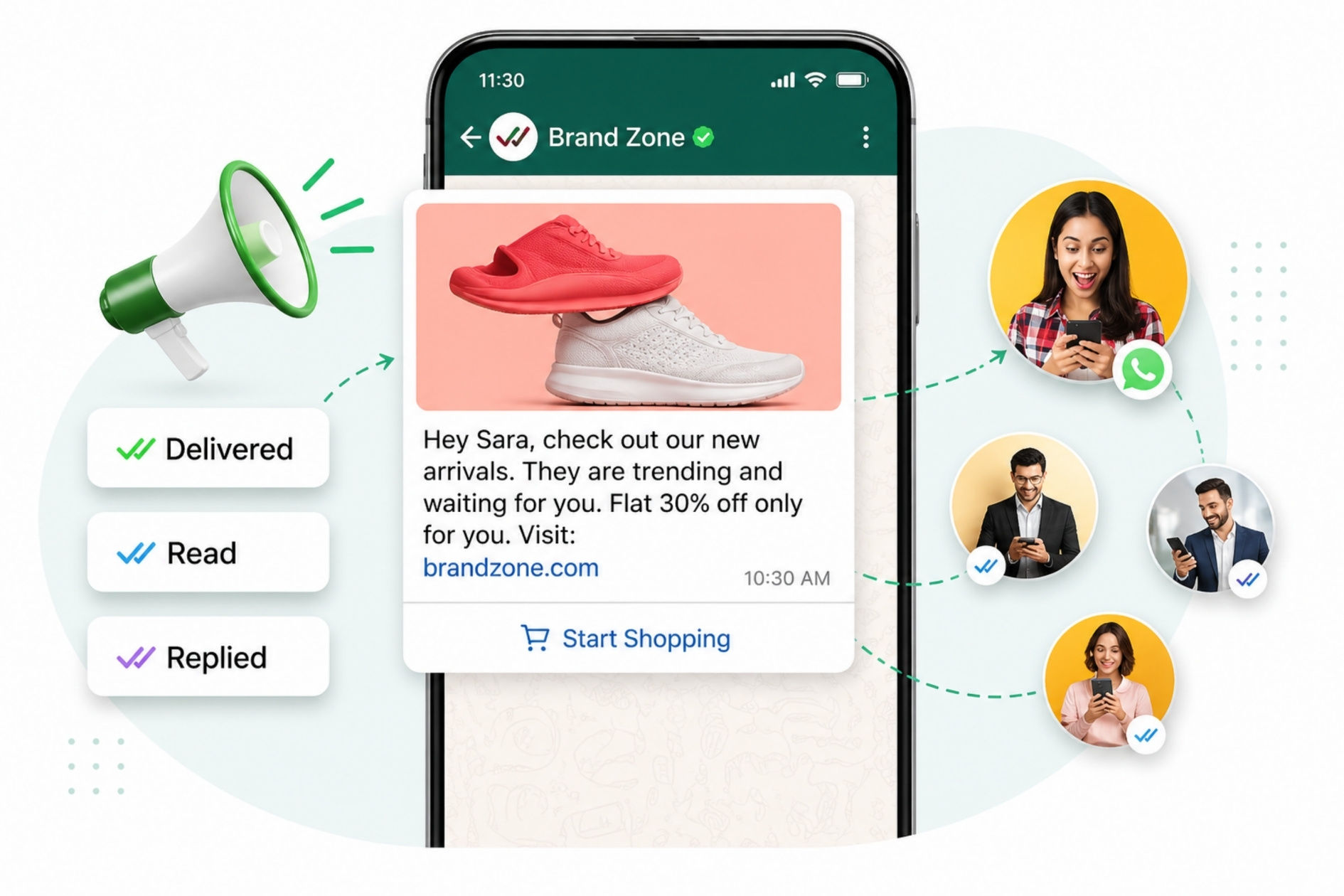
Let’s understand this in a very simple way.
When you use a normal WhatsApp or even WhatsApp Business app, you can chat with customers, reply to messages, and share information. But when your business grows and you start getting too many messages, handling everything manually becomes very difficult. This is where WhatsApp Business API comes in.
WhatsApp Business API is a special version of WhatsApp made for medium and large businesses. It helps you manage a large number of customers intuitively. You cannot use it like a normal app. It works with software and tools that help you automate your communication.
Now let’s talk about WhatsApp automation tools.
These tools are like smart assistants that help you reply to customers automatically. Imagine you are sleeping at night and a customer sends a message. Normally, they would have to wait for your reply. But with automation, they get an instant response. This improves customer experience and builds trust.
For example, when a new customer sends a message, you can set an automatic welcome message like, “Hi, thank you for contacting us. How can we help you?” This is called customer onboarding automation. It gives a professional feel and look to your business.
You can also set replies for common questions. If many customers ask the same thing, like price or delivery time, you don’t need to type again and again. The system can send the reply automatically. This saves your time and effort while answering the customer’s inquiries instantly.
Another powerful feature is trigger-based messages. This means messages are sent based on customer actions. For example:
- If a customer places an order, they get a confirmation message.
- If their order is shipped, they get a tracking update.
- If they don’t reply, you can send a follow-up message.
This makes communication smooth and automatic with zero manual efforts.
Businesses also use Whatsapp Business’ tools for bulk campaigns. This implies sending messages to thousands of customers at once smoothly. For example, you can send offers, discounts, or updates to your contact list. It helps in marketing and increases sales.
Now let’s understand WhatsApp software.
Whatsapp API software gives you a dashboard where you can see all customer chats in one place. You can manage conversations easily, assign chats to different team members, and track performance. It also provides analytics, which shows how many messages were sent, how many customers replied, and how your campaigns performed.
Some tools also connect with CRM systems. This means all your customer data stays organized. You can see customer history, past chats, and preferences in one place. This helps you provide a better and more personalized service to your clientele.
In simple words, WhatsApp Business API and automation tools help you handle more customers with less effort. It is like having a team that works 24/7 without any burnout. It reduces TAT(turn around time), improves response speed, and makes your business look more professional and trustworthy.
If your business is growing, using these tools is not just helpful in this age. It is necessary to manage everything smoothly and efficiently, if you want to grow from handling 5 to 50k customers per day.
WhatsApp Automation & Scheduling
How to Schedule Messages on WhatsApp
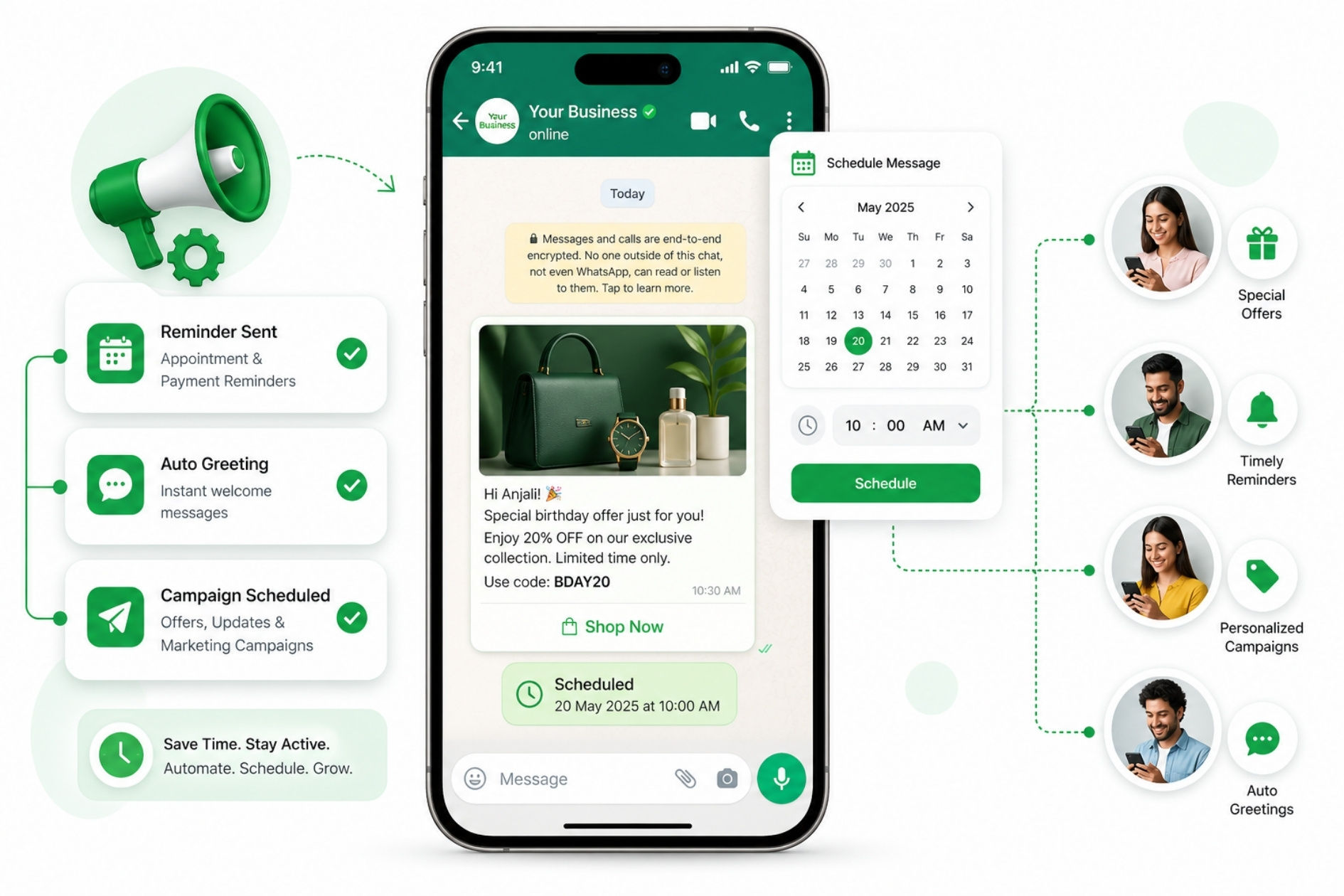
WhatsApp is very useful for communication, but one thing it does not support directly is message scheduling. This means you cannot set a message to be sent automatically at a specific time using the normal WhatsApp app. But don’t worry, you can use WhatsApp automation tools to achieve this effectively.
Automation tools help you schedule messages in advance. For example, you can write a message today and set it to be sent tomorrow, next week, or at any specific time. This is very helpful for businesses.
Scheduled messages can be used for many purposes. You can send reminders to customers about appointments or payments. You can also set automatic greeting messages when someone contacts you. Businesses also use it to plan marketing campaigns, like sending offers or updates at the right time.
Imagine sending birthday special offers or special discount offers based on purchase history to customers automatically. You don’t have to remember every date. The system does everything for you.
In simple words, WhatsApp automation and scheduling save your time and make your work easier. It helps you stay active, even when you are busy or offline, and improves your communication with customers.
Bulk Broadcast & WhatsApp Marketing
What is Bulk Broadcast?
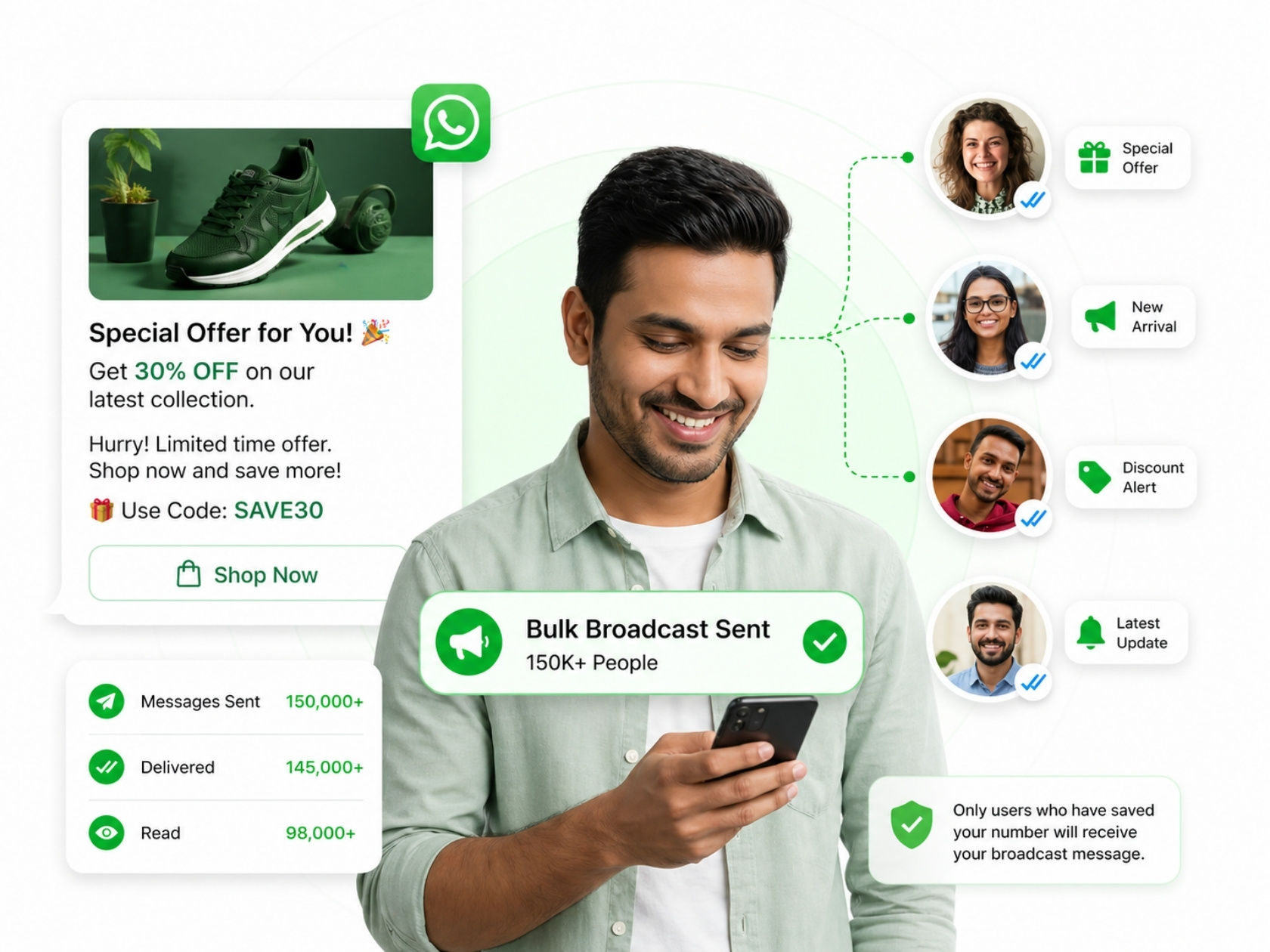
Bulk broadcast is a very useful feature in WhatsApp, especially for businesses. It allows you to send one message to many people at the same time. The best part is that you don’t need to create a group with all your users for this.
When you send a broadcast message, each person receives it as a normal private message. They cannot see other people who got the same message. This makes it feel personal, just like a one-to-one chat. That’s why it works very well for marketing.
Businesses use bulk broadcasts to save time and reach more customers simultaneously. Instead of sending messages one by one, you can send a single message to hundreds or even thousands of people in just one click.
You can use bulk broadcast for many purposes like:
- Sending special offers and discounts
- Announcing new product launches
- Sharing event details or updates
- Sending important customer notifications
This helps businesses stay connected with their audience and keep them informed.
But there is one important rule you should know. WhatsApp will only deliver your broadcast message to users who have saved your number in their phone. If someone has not saved your number, they will not receive your message.
That’s why building a good contact list is very important. You should always collect customer details properly and ask them to save your number. This increases your message delivery rates and improves results.
In simple words, bulk broadcast is a smart way to send messages to many people while keeping the conversation private and personal. It saves time, improves customer communication, and helps businesses grow faster.
WhatsApp Broadcast Meaning & How Bulk Broadcast Works
The word “broadcast” is very simple to understand. It means sending one message to many people at the same time. Instead of sending messages one by one, you can send a single message to multiple contacts together. This saves time and effort.
This feature is very useful, especially for businesses. With WhatsApp broadcast, you can send messages to many customers at once without creating a group. The best part is that each person receives the message as a personal chat. This makes the communication feel more direct and private.
Let’s understand this in a simple way. Imagine you have 100 customers, and you want to tell them about a new offer. If you send messages one by one, it will take a lot of time. But with broadcast, you can send the same message to all 100 people in just one click. This makes your work faster and easier.
Another important thing about WhatsApp broadcasts is that your contacts will only receive your message if they have saved your number in their phone. This helps in maintaining quality communication and avoids spam. So, businesses must make sure that customers save their number.
Broadcast is different from WhatsApp groups. In a group, everyone can see each other’s messages. But in broadcast, messages are sent privately. This is better for marketing because customers do not like crowded group chats.
The impact of broadcast in marketing is very powerful. Businesses can use it to:
- Send offers and discounts
- Share updates and announcements
- Remind customers about services
- Promote new products
- Build strong customer relationships
It helps businesses stay connected with their audience regularly. When customers receive useful and relevant messages, they are more likely to trust the brand and take action.
Using broadcast properly can increase engagement and sales. But it is important not to send too many messages. Always share valuable and meaningful content so customers do not feel annoyed.
Here are some key points to remember:
- Broadcast means sending one message to many people
- WhatsApp broadcast sends messages privately
- It is very useful for marketing and communication
- Helps save time and improve customer engagement
WhatsApp broadcast is a powerful feature used in whatsapp marketing and whatsapp business web communication. Businesses use bulk broadcast and whatsapp broadcast marketing to send offers, updates, and messages to many users at once.
It works well with tools like whatsapp automation tool and whatsapp software, making communication faster and easier. By using broadcast smartly, businesses can improve customer engagement, build trust, and grow their brand effectively.
Click to WhatsApp Ads (Lead Generation Strategy)
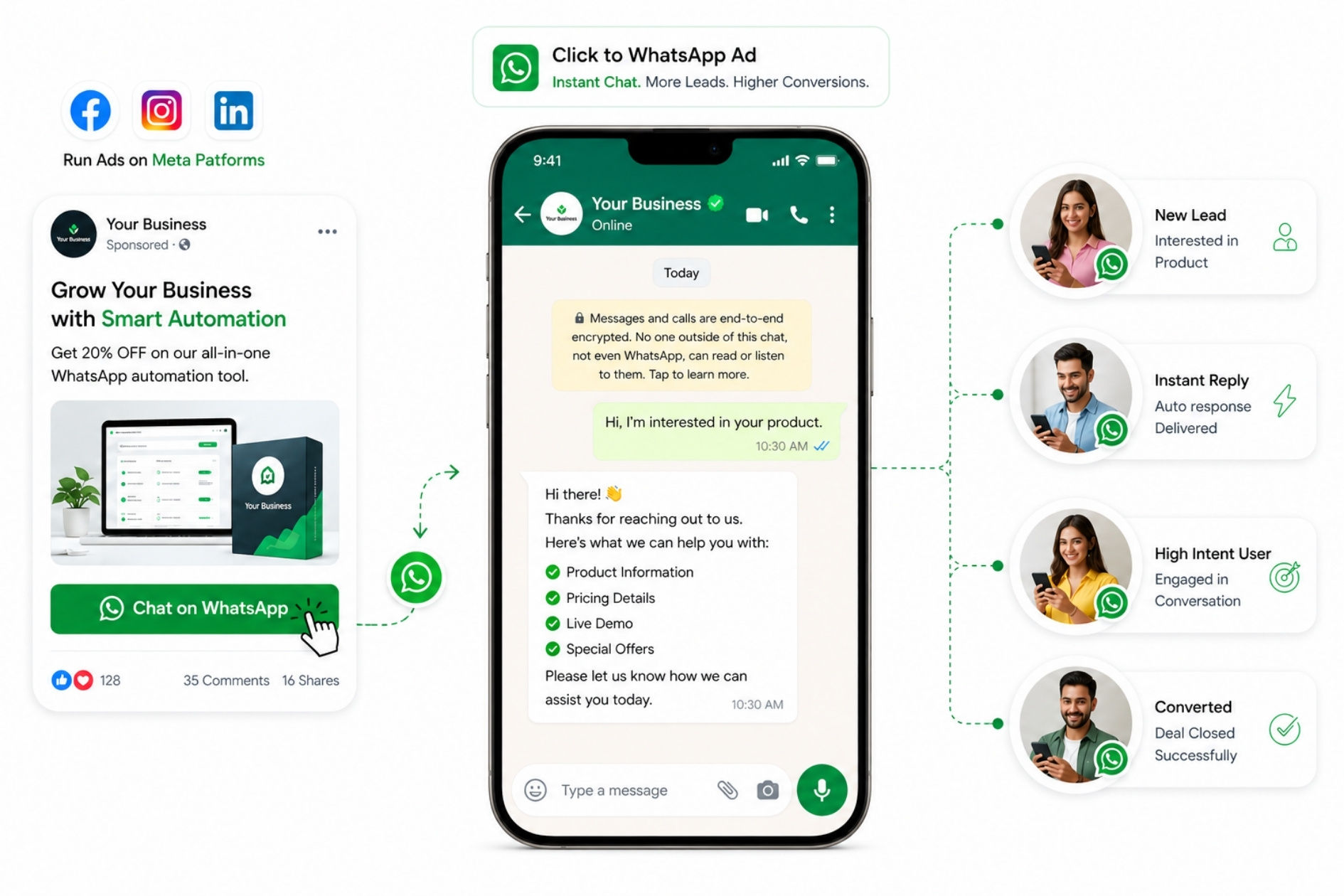
Click to WhatsApp Ads are a very powerful way to generate leads for your business. These ads run on meta platforms like Facebook and Instagram or networking platforms like LinkedIn. When a user clicks on the ad, instead of going to a website, they are directly taken to a WhatsApp chat with your business.
This makes the process very simple and fast. Users don’t need to fill forms, visit pages, or search for contact details. They can directly start chatting with you. Because of this, the chances of getting leads and conversions become much higher.
Let’s understand this in a simple way. Imagine a user sees your ad while scrolling on Instagram. They are interested in your product. If you send them to a website, they may leave without taking action. But if they click and directly open WhatsApp chat, they can ask questions instantly. This increases trust and improves communication.
One of the biggest advantages of Click to WhatsApp Ads is less friction. This means fewer steps to convert a prospect into a buyer. The easier it is for customers to talk to you, the more sales you get.
Here are some key things businesses can do with these ads:
Start Instant Conversations
Customers can directly message your business with one click. This makes communication quick and easy.
Capture High-Quality Leads
People who message you are already interested, so they are more likely to become customers.
Improve Response Time
Businesses can reply quickly and solve customer queries in real time automatically.
Increase Sales Opportunities
Direct conversations help build trust and close deals faster.
Another powerful benefit is automation. When you connect Click to WhatsApp Ads with a whatsapp automation tool, you can send automatic replies to new users. For example, when someone clicks your ad and sends a message, they can instantly receive a welcome message or product details.
This makes your business look professional and responsive. It also saves time because you don’t have to reply manually every time.
Businesses can also use pre-filled messages in ads. This means when a user clicks the ad, a message is already written in the chat box. The user just needs to press send. This further increases conversions.
Click to WhatsApp Ads are especially useful for:
- Lead generation
- Customer support
- Product inquiries
- Booking and appointments
Here are some key benefits:
- Faster communication
- Higher conversion rates
- Better customer experience
- Easy lead management
- Works well with automation
Used correctly, Click to WhatsApp Ads can become one of the fastest and most cost-effective ways to turn social media traffic into real business conversations.
Send Message Without Saving Number
Many people search for one common question: how to send WhatsApp messages without saving a number. The good news is, it is very simple and useful, especially for businesses and daily users.
Normally, when you want to send a message on WhatsApp, you first need to save the person’s number in your phone. But this can make your contact list messy, especially if you talk to many unknown or one-time users. To solve this problem, WhatsApp allows you to send messages without saving the number by using a simple link method.
Let’s understand this step by step in a very easy way:
- Open your browser (Chrome, Safari, etc.)
- In the search bar, type: wa.me/number
- Enter the phone number with country code (Example: wa.me/919876543210)
- Press Enter
- Click on “Continue to Chat”
- WhatsApp will open, and you can start chatting
That’s it! You can now send messages without saving the contact in your phone.
This method is very helpful in real life. For example, if you want to contact a delivery person, customer, or service provider only once, you don’t need to save their number. You can directly send a message and finish your work.
For businesses, this feature is even more powerful. Companies often deal with many customers daily. Saving every number is not practical. By using this method, businesses can communicate quickly and keep their contact list clean and organized.
Another benefit is speed. You can instantly start a chat without going through multiple steps. This improves productivity and makes communication faster.
Businesses also use this feature in marketing. They create clickable links (wa.me links) and share them on websites, ads, or social media. When customers click the link, they are directly taken to WhatsApp chat. This increases chances of getting more leads and conversations.
Here are some key benefits of sending messages without saving numbers:
- Saves time and effort
- Keeps your contact list clean
- Useful for one-time conversations
- Helps businesses manage large customer queries
- Makes communication fast and convenient
However, always make sure you are messaging the correct number. Avoid sending spam messages, as it can affect your account’s health that results in getting blocked by Meta.
Sending a whatsapp message without saving a number is very easy using a wa.me link. Businesses using whatsapp business web can quickly connect with customers without storing their contacts. This method works well with whatsapp direct message, click to whatsapp ads, and whatsapp automation tools, making communication smooth and fast. It is a smart way to improve customer interaction while keeping your contact list clean and organized.
WhatsApp Chatbot for Business Automation
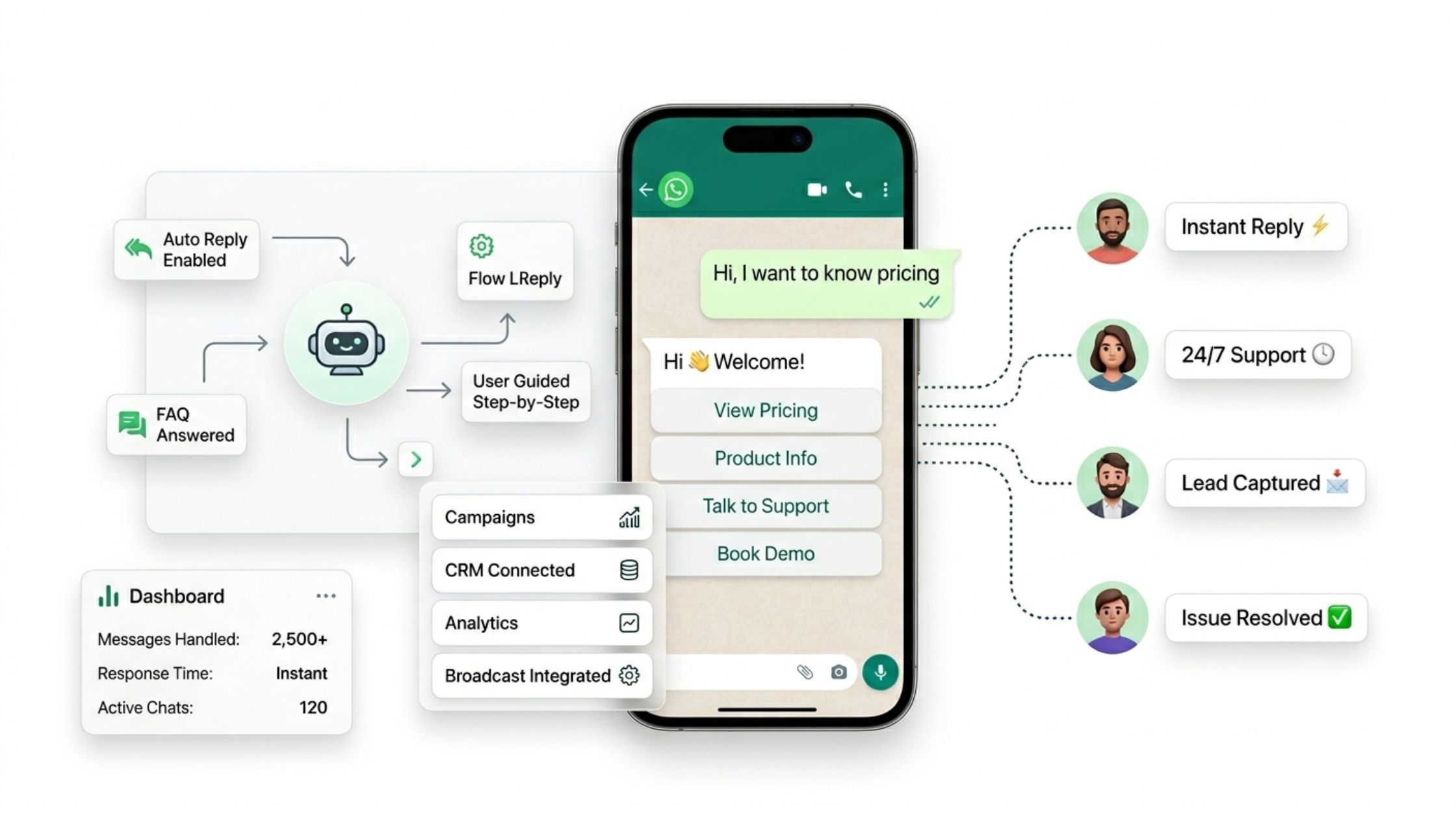
A WhatsApp chatbot is like a smart virtual assistant that can reply to customer messages automatically. It works all the time24 hours a day, 7 days a week without needing a human to type replies. This makes it very useful for businesses that receive many messages daily.
In simple words, a chatbot helps you talk to customers even when you are busy or offline. It can answer questions, share information, and guide users step by step. This makes communication faster and smoother.
Chatbots are mostly used with the WhatsApp Business API. This allows businesses to automate conversations and manage large numbers of customers at the same time. Without a chatbot, handling hundreds of messages manually can be very difficult.
Let’s understand how a chatbot works. When a customer sends a message, the chatbot reads it and gives an automatic reply based on pre-set rules or flows. For example, if someone asks about pricing, the chatbot can instantly send product details. If someone says “Hi,” it can send a welcome message.
Here are some important things you can do with chatbots:
Answer Common Questions Instantly
Chatbots can reply to frequently asked questions like price, timing, location, or services. This saves time for both customers and businesses.
Guide Users Through Products or Services
A chatbot can help customers choose products by asking simple questions and showing options step by step.
Collect Customer Information
Chatbots can ask for details like name, phone number, or email. This helps businesses generate leads and build a customer database.
Provide Support Anytime
Since chatbots work 24/7, customers can get help anytime, even at night or during holidays.
For businesses, this is very powerful. It improves response time and ensures that no message is missed. Fast replies make customers happy and increase trust.
Another big advantage is workload reduction. Instead of replying to every message manually, businesses can automate most conversations. This allows teams to focus on more important tasks.
Chatbots also help in scaling communication. Whether you have 10 customers or 10,000, a chatbot can handle all conversations easily. This makes it perfect for growing businesses.
Here are some key benefits of using WhatsApp chatbots:
- Saves time and effort
- Provides instant replies
- Improves customer experience
- Handles multiple chats at once
- Helps in lead generation and sales
A whatsapp chatbot is a powerful tool used with whatsapp business web and whatsapp business api to automate customer communication. Businesses using whatsapp automation tools and whatsapp software can manage whatsapp direct message and customer queries more efficiently.
Chatbots help in handling bulk broadcast responses, improving engagement, and providing instant support. By using chatbot automation, businesses can save time, reduce workload, and deliver a better customer experience while scaling their communication easily.
WhatsApp Tools for Automation
Running a business on WhatsApp becomes much easier when you use the right tools. While a basic WhatsApp Business app works for small operations, growing businesses need proper software to manage communication at scale.
Most automation tools come with four core features. Chatbots handle customer queries automatically, so your team doesn't have to reply to every "what's your price?" message manually. Campaign management lets you plan and send bulk messages to your entire contact list at a scheduled time, which is useful for promotions or announcements. Analytics dashboards show you real numbers how many messages were delivered, how many people responded, and which campaigns performed best. CRM integration keeps all your customer data in one place, so you always know who you're talking to and what they need.
The real advantage of using these tools together is consistency. Your customers get faster replies, your team spends less time on repetitive tasks, and your marketing becomes easier to track and improve over time.
If you are just starting out, even a basic automation tool can save you several hours every week. As your business grows, these tools grow with you.
WhatsApp Features You Should Know
How to Hide Blue Tick (Double Tick)
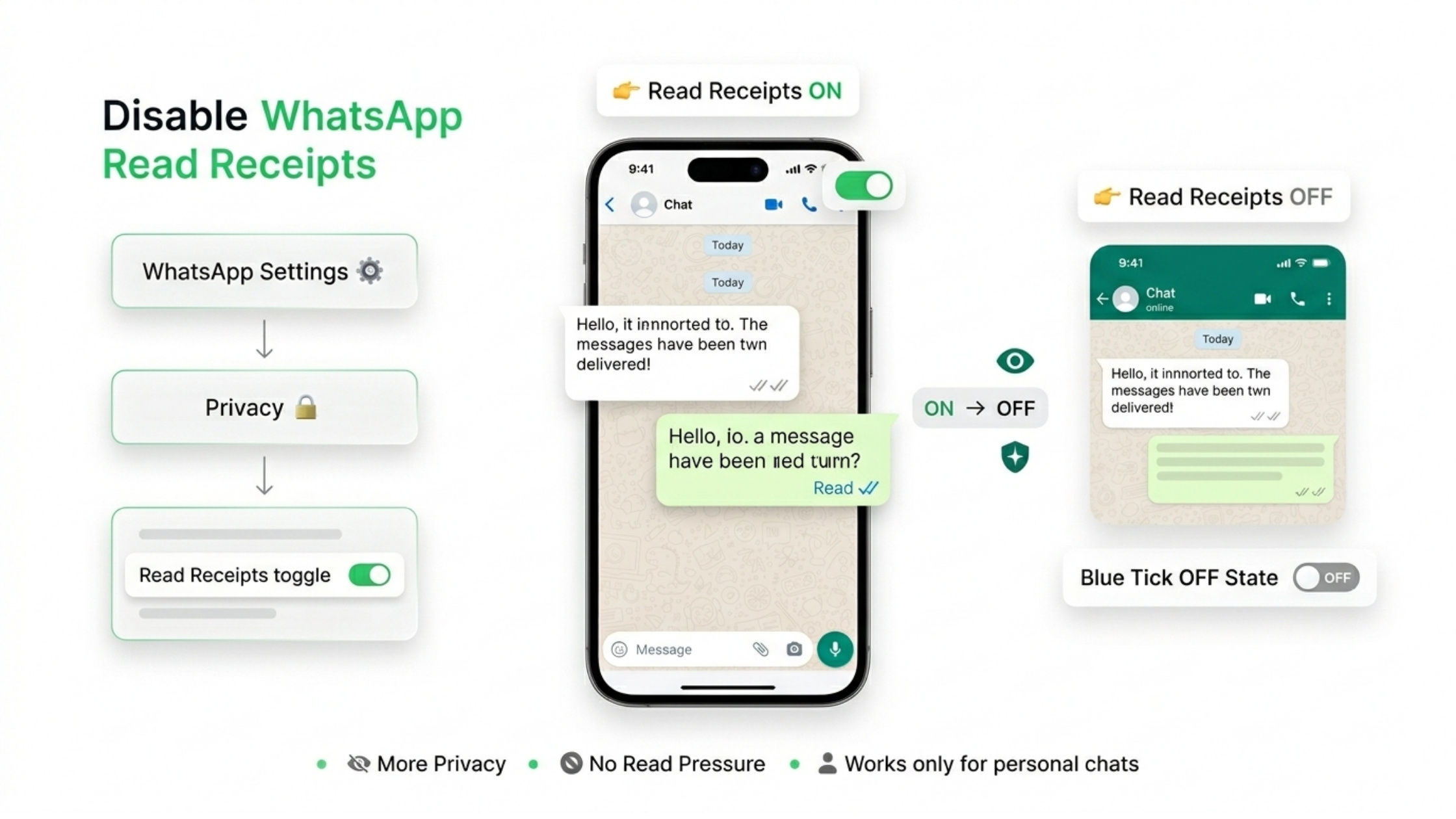
WhatsApp has a simple system to show message status, and it is called ticks. When you send a message, you will see one tick, two ticks, or blue ticks. Each tick has a meaning. One grey tick means your message is sent. Two grey ticks mean the message is delivered to the other person. And when the two ticks turn blue, it means the person has read your message.
This blue tick feature is helpful because it tells you if someone has seen your message. But sometimes, it can also create pressure. For example, if you read a message but don’t reply immediately, the other person may think you are ignoring them. This can be uncomfortable, especially in personal or business situations.
That’s why many people want to hide blue ticks in WhatsApp. It gives you more privacy and control over your replies. You can read messages without letting the other person know. This way, you can reply when you are ready, without any pressure.
Now let’s understand how to turn off blue ticks step by step.
First, open your WhatsApp app on your phone. Then go to Settings. In settings, you will see an option called Privacy. Tap on it. Inside the privacy section, you will find an option called Read Receipts. This is the feature that controls blue ticks.
If you turn off Read Receipts, the blue ticks will stop working. This means when you read someone’s message, they will not see blue ticks. For them, it will still show as delivered (two grey ticks), even if you have already read it.
This sounds great, but there is one important thing you should know. When you turn off blue ticks, it works both ways. This means you also will not be able to see when others read your messages. So if you send a message, you will not know if the other person has seen it or not.
Another important point is that this feature does not work in group chats. In group chats, blue ticks (or read status) will still be visible. You can check who has read your message by tapping on message info. So even if you turn off read receipts, it only works for personal chats, not groups.
People use this feature for many reasons. Some use it for privacy, some to avoid pressure, and some to manage their time better. For example, if you are busy with work, you may not want to reply immediately. By hiding blue ticks, you can read messages and reply later without worrying.
For businesses, this feature can also be useful. Sometimes, businesses receive many messages, and they cannot reply instantly. If blue ticks are on, customers may expect a quick reply. By turning them off, businesses can manage expectations better and reply properly when ready.
In simple words, hiding blue ticks gives you more freedom. You can read messages quietly and respond at your own time. It reduces stress and helps you stay in control of your communication.
So, if you want more privacy and less pressure while using WhatsApp, turning off blue ticks is a simple and useful option.
WhatsApp Links & Direct Messaging
WA.me Link & WhatsApp Message Link Creation
A WhatsApp link is a special link that allows people to start a chat with you instantly. You may have seen links like wa.me/1234567890. When someone clicks on this link, a WhatsApp chat opens connected to your business number, and the interested buyer can message you without saving your number. You can post this link on your socials, posts, ads, anywhere… So people can reach out to you wherever they see you.
This is very useful for businesses because it makes communication quick and easy. Many people don’t like saving numbers just to ask one question. With a WhatsApp link, they can message you in just one click.
You can use these links in many places, such as:
- Your website
- Online ads (Facebook, Google, Instagram)
- Landing pages
- Social media profiles
This helps you get more messages from customers because the process is simple and fast. It helps your clients to browse, shop and pay inside a single chat instead of switching 20 apps to buy a single item.
Another powerful feature is pre-filled messages. This means you can create a link where the message is already written. For example, when someone clicks the link, they will see a message like “Hi, I want to know about your services.” They just need to press send.
This saves time for the user and also helps you understand what they are looking for. It makes the conversation start smoothly and quickly.
For businesses, this increases conversion rates. More people will contact you because there is no extra step. The easier you make it for customers, the more chances you get to increment leads and sales metrics.
WhatsApp links help you connect with customers faster, reduce effort, and improve communication. It is a small tool, but it can make a big difference in your business growth.
Pinned Message & How to Pin Chats
Sometimes we have many chats on WhatsApp, and important conversations get lost in the list. This can be frustrating, especially when you need quick access to certain chats like customers, clients, family, or work-related messages. To solve this problem, WhatsApp provides a simple feature called “Pin Chat”.
The pinned message feature helps you keep important chats at the top of your WhatsApp chat list. This means no matter how many new messages you receive, your pinned chats will always stay on top. It makes your communication more organized and saves time.
Let’s understand how to pin chats step by step in a very easy way:
- Open WhatsApp on your phone
- Find the chat you want to pin
- Long press on that chat
- Tap on the pin icon (📌) at the top
- That’s it! Your chat is now pinned and will always stay at the top.
You can pin up to a limited number of chats (usually 3 chats on standard WhatsApp). If you want to unpin a chat, just follow the same steps and tap the unpin option.
This feature is very useful in daily life. For example, you can pin chats with your family members, boss, or important contacts so you don’t have to search for them again and again.
For businesses, this feature is even more helpful. If you are handling many customer conversations, you can pin priority chats like high-value clients, urgent queries, or ongoing deals. This helps you respond faster and provide better service.
Pinned chats also improve productivity. Instead of scrolling through many messages, you can directly open important chats from the top. It saves time and reduces confusion.
Another advantage is better organization. Your WhatsApp becomes cleaner and easier to use. You can focus on important conversations without distractions.
Here are some key benefits of using pinned chats:
- Keeps important chats at the top
- Saves time and effort
- Improves communication speed
- Helps businesses manage priority customers
- Makes WhatsApp more organized
However, it is important to pin only important chats. If you pin too many chats, it can reduce the usefulness of this feature.
The whatsapp pinned message feature is very useful for managing important conversations in whatsapp business web and whatsapp web business. Businesses using whatsapp automation tools and whatsapp software can pin priority chats to handle customer queries quickly. It also works well with whatsapp direct message and daily communication, helping users stay organized. By using pinned chats smartly, you can improve your workflow, save time, and make communication more efficient.
WhatsApp Business Profile Setup: First Impressions That Build Trust
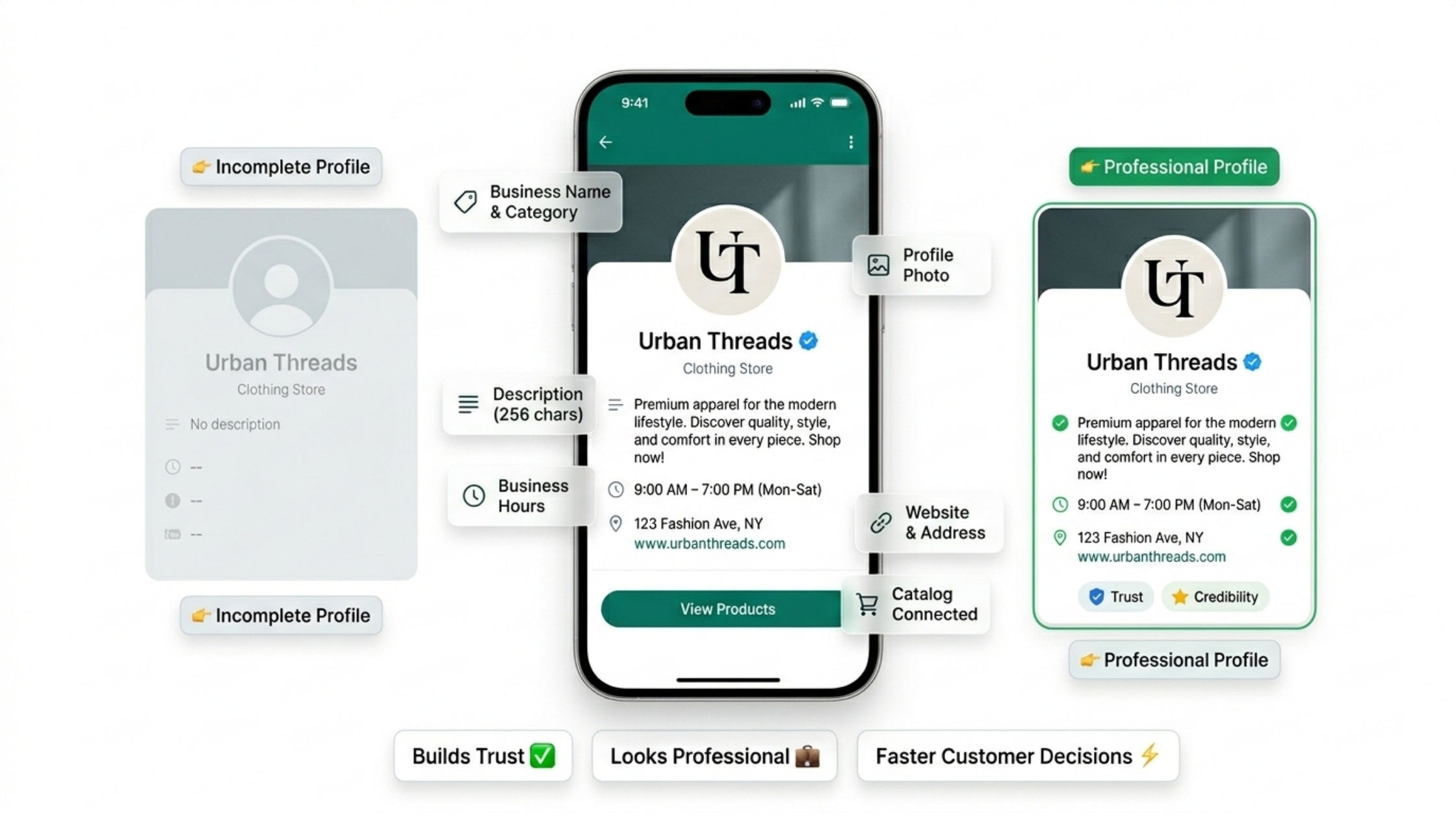
When a customer messages your business for the first time, the very first thing they see is not your product, it is your profile. A well-set-up WhatsApp Business profile can instantly make your business look credible, professional, and trustworthy. On the other hand, an incomplete profile can make customers doubt whether your business is genuine.
Setting up your profile correctly takes less than 10 minutes, but the impact it creates lasts a long time.
Business Name and Category
Your business name should be clear and match what you actually sell or offer. Do not use vague names. When you select a business category, choose the one that is closest to your industry. This helps customers immediately understand what your business does before they even send a message.
Profile Photo
Use your company logo as your profile photo. If you are a solo entrepreneur or freelancer, a clean professional photo of yourself works well too. Avoid using random images or leaving the profile picture blank. A recognizable profile photo builds familiarity and makes customers feel they are talking to a real, established business.
Business Description
This is one of the most underused parts of the WhatsApp Business profile. You get 256 characters to tell customers who you are, what you offer, and why they should choose you. Use this space wisely. For example, instead of writing "We sell clothes," write something like "Premium cotton clothing for men and women. Fast delivery across India. Message us to place your order." It is specific, clear, and gives the customer a reason to continue the conversation.
Business Hours
Always mention your working hours. This sets proper expectations. If a customer messages you at midnight and sees that your hours are 9 AM to 7 PM, they will not feel ignored when they don't get an instant reply. It also makes your business look organized and professional.
Address and Website
If you have a physical store, add your address. Customers often want to know if they can visit in person. Adding a website link also increases trust significantly. Even a simple landing page or Instagram link works if you don't have a full website.
Catalog Link
Once your product catalog is set up, it connects directly to your profile. This means when someone visits your profile, they can immediately browse your products without asking a single question. It reduces back-and-forth conversation and speeds up the buying decision.
Why This Matters for Your Business
Think of your WhatsApp Business profile as your digital business card. Every detail you fill in adds another layer of trust. Customers are more likely to buy from businesses that look complete and professional. A blank or poorly filled profile, even if your products are excellent, can cause potential customers to hesitate.
Backup & Security
How to Take WhatsApp Backup
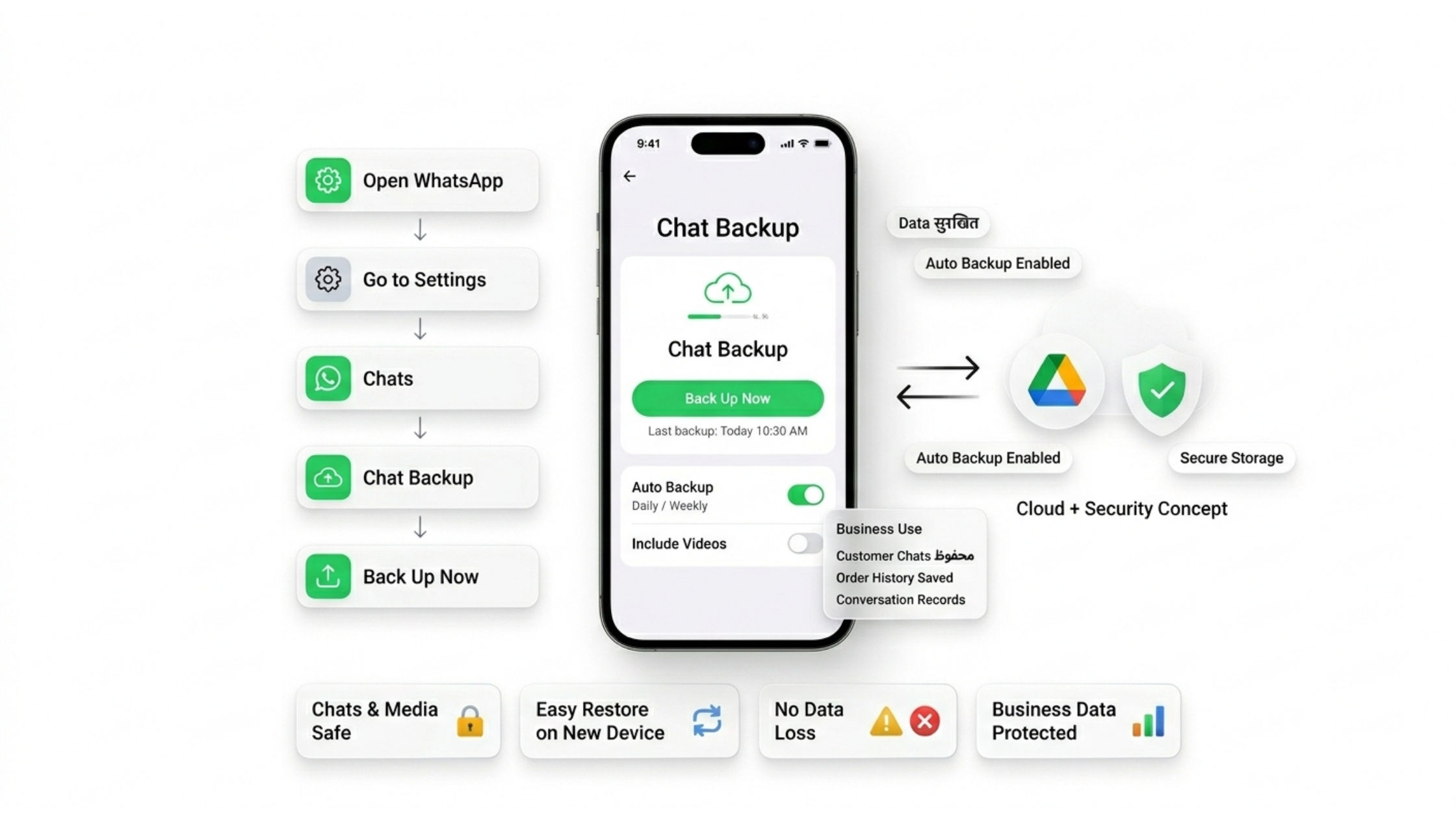
Keeping your WhatsApp data safe is very important. Sometimes your phone can get lost, damaged, or reset. In such cases, you may lose all your chats, contacts, and important messages. That’s why taking a WhatsApp backup is very useful. It helps you save your data so you can restore it anytime.
WhatsApp gives you an easy option to back up your chats. You can store your backup on Google Drive (for Android users) or save it locally on your phone. This means even if something happens to your device, your data stays safe.
Let’s understand how to take backup step by step in a simple way:
- Open WhatsApp on your phone
- Go to Settings
- Tap on Chats
- Click on Chat Backup
- Tap on Back Up Now
Once you do this, your chats will be saved. You can also set automatic backup, so your data is saved daily, weekly, or monthly without doing it manually.
Backing up is not just for personal useit is very important for businesses too. If you are using WhatsApp for customer communication, losing chats can mean losing important customer data, order details, and conversation history. This can affect your business badly.
Regular backup helps businesses stay safe and organized. Even if you change your phone or reinstall WhatsApp, you can restore all chats easily. It also helps in maintaining records of customer conversations, which can be useful for support and tracking.
Here are some key benefits of taking WhatsApp backup:
- Keeps your chats and media safe
- Helps restore data on a new device
- Protects important business conversations
- Saves time and prevents data loss
- Keeps your information secure
Taking regular WhatsApp backup is very important for both personal and business use. Businesses using WhatsApp business web, web business WhatsApp, or WhatsApp automation tools handle many customer chats daily, so losing data can be a big problem. With proper backup, you can safely store chats, media, and important details.
It also supports features like WhatsApp account info report, bulk broadcast history, and WhatsApp direct message tracking. In simple words, backup is a smart way to protect your data and keep your communication safe and secure.
WhatsApp Shop & Business Use Cases
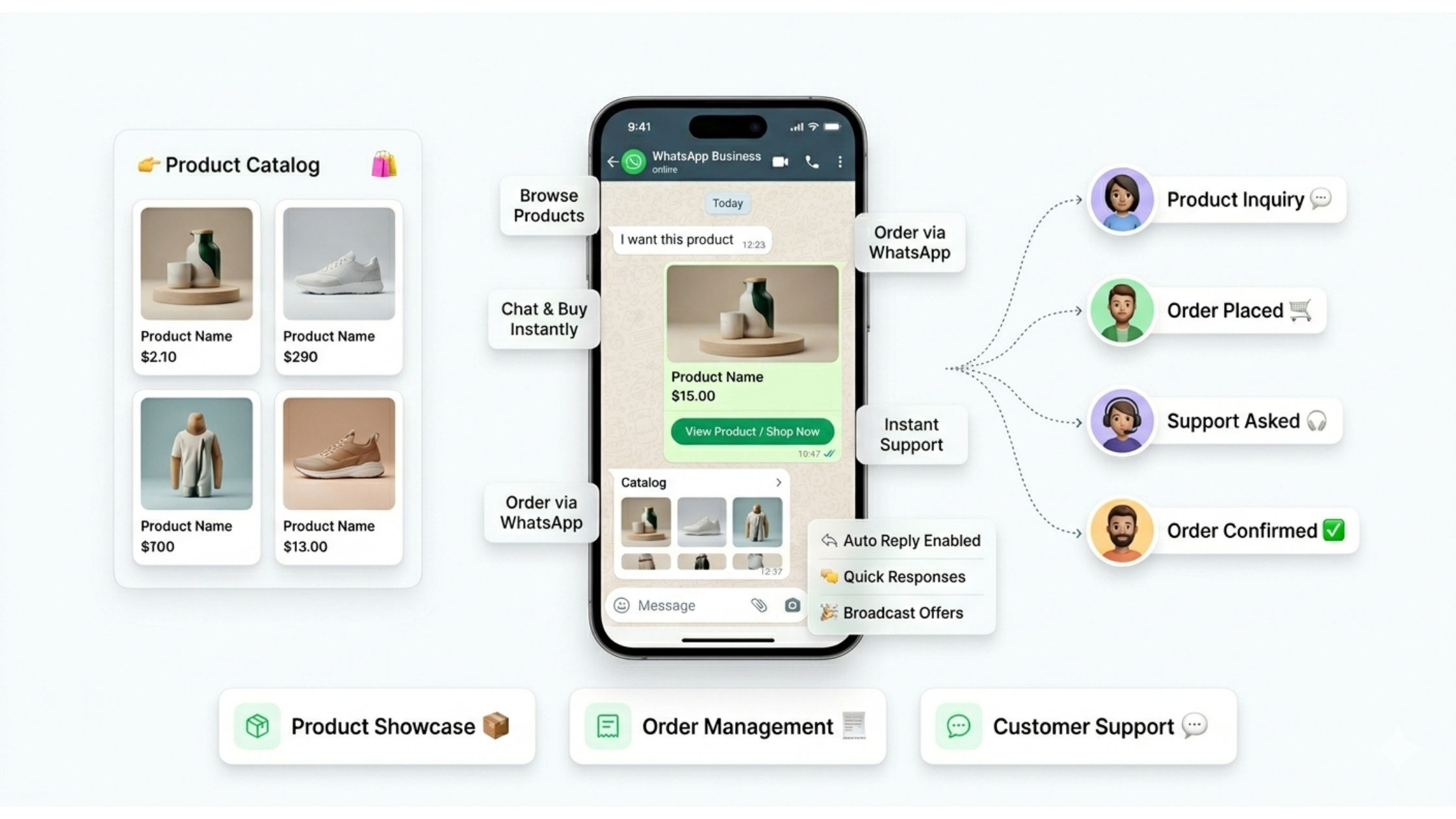
The WhatsApp shop feature is a very useful tool for businesses. It allows you to show your products directly inside WhatsApp. This means customers do not need to visit a website or download any extra app. Everything happens inside the chat, which makes the process simple and fast.
You can create a product catalog where you add product images, names, prices, and descriptions. When a customer opens your profile, they can see all your products in one place. It works like a small online shop inside WhatsApp. Customers can browse products, select what they like, and send a message to ask questions or place an order.
This makes shopping very easy for customers. They can talk to you directly, clear their doubts, and get instant replies. It feels more personal compared to normal online shopping.
Businesses use WhatsApp shop in many ways:
Product Catalogs – You can display all your products with images and details. This helps customers understand your offerings clearly.
Order Management – Customers can place orders through chat. You can confirm orders, share payment details, and update delivery status easily.
Customer Support – If customers have questions, they can ask directly in chat. You can guide them and solve their problems quickly.
The WhatsApp shop is an important feature in WhatsApp business web and web business WhatsApp that helps businesses sell products easily. With the help of a product catalog, businesses can show their items directly to customers without needing a website. Customers can explore products, ask questions using WhatsApp direct messages, and even place orders in the same chat. This makes communication smooth and fast.
Businesses can also use WhatsApp automation tools to reply instantly and manage customer queries. Many companies combine this with bulk broadcast to send product updates and offers. Overall, WhatsApp shop is a simple and powerful way to grow your business and improve customer experience without using complex systems.
WhatsApp Analytics & Performance Tracking
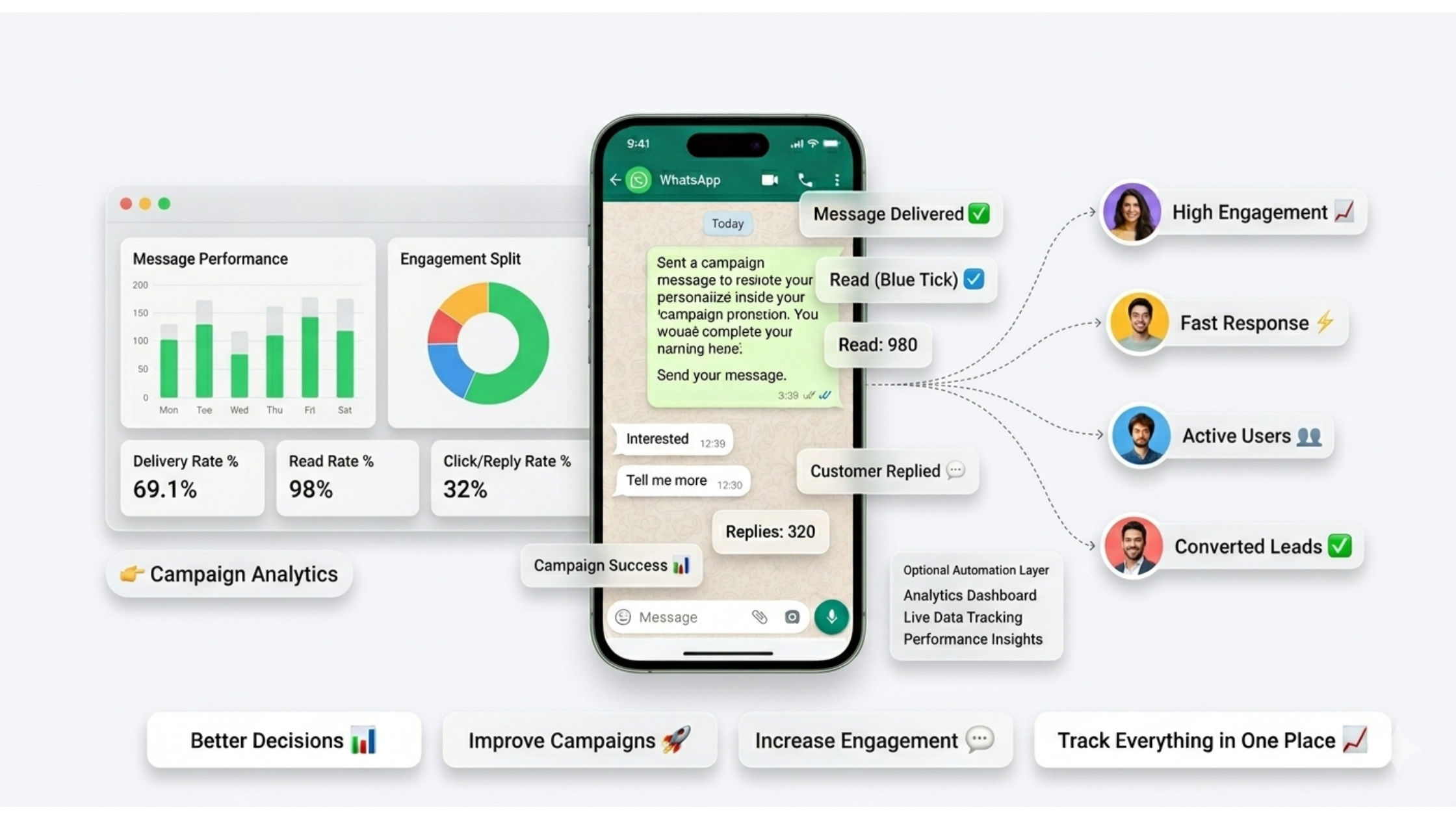
To grow any business, tracking your performance is very important. If you don’t measure your results, you will not know what is working and what needs improvement. This is where WhatsApp analytics becomes very useful.
WhatsApp analytics helps you understand how your messages, campaigns, and customer interactions are performing. It gives you clear data so you can make better decisions and improve your communication strategy.
Let’s understand this in a simple way. When you send messages to customers, you want to know:
- Did they receive the message?
- Did they read it?
- Did they reply?
- Was the campaign successful?
All these answers come from analytics.
Businesses using WhatsApp software and WhatsApp automation tools can easily track important data. These tools provide dashboards where you can see everything in one place.
Here are the main things you can track:
Message Delivery Rates
This shows how many messages were successfully delivered to users. If delivery is low, there may be issues with your contact list or numbers.
Read Rates (Blue Tick Data)
This tells you how many people opened and read your message. High read rates mean your message is reaching and attracting users.
Customer Response Time
This shows how quickly you reply to customer messages. Faster replies improve customer satisfaction and trust.
Campaign Performance
This helps you understand how well your marketing campaigns are working. You can see which messages get more replies, clicks, or conversions.
These insights are very powerful. For example, if one message gets more replies than others, you can use a similar style in future campaigns. If a message is not performing well, you can improve it.
Analytics also helps you understand customer behavior. You can learn what your customers like, when they are active, and how they respond to your messages. This helps you create better content and improve engagement.
For businesses, this is very important. Instead of guessing, you make decisions based on real data. This reduces mistakes and increases success.
Here are some key benefits of WhatsApp analytics:
- Helps improve message quality
- Increases customer engagement
- Improves response time
- Makes campaigns more effective
- Helps in better decision-making
When you regularly track your performance, your business grows faster. You can identify problems early and fix them quickly.
Using whatsapp analytics with the whatsapp business web can help businesses track performance easily. Tools like whatsapp automation tool and whatsapp software provide insights into bulk broadcast, message delivery, and whatsapp direct message responses. This helps businesses understand customer behavior and improve communication strategies. With proper tracking and analysis, businesses can increase engagement, optimize campaigns, and achieve better results over time.
Conclusion
WhatsApp is not just a simple messaging app anymore. Today, it has become a complete business tool that helps companies connect with their customers in a fast and easy way. Millions of people use WhatsApp every day, which makes it a powerful platform for communication, marketing, and customer support.
Earlier, people used WhatsApp only for chatting with friends and family. But now, businesses use it to send updates, answer customer questions, share product details, and even close sales. With features like WhatsApp Business Web login, companies can manage conversations from their computer, making work faster and more organized.
One of the biggest advantages of WhatsApp is bulk broadcasting. Businesses can send messages to many customers at the same time. This is very useful for sharing offers, updates, and important notifications. It saves time and helps businesses reach more people quickly.
Another important feature is automation tools. These tools help businesses reply to customers instantly, even when no one is available. For example, auto-replies, chatbots, and quick responses make communication smooth and professional. This improves customer experience and builds trust.
WhatsApp also allows you to create message links (like wa.me links). These links help customers start a chat with just one click. Businesses can use these links on their website, ads, or social media to get more inquiries and leads.
Using all these features together makes WhatsApp a complete ecosystem. It is not just about sending messages it is about building relationships, improving communication, and growing your business.
If you want to grow your business in today’s digital world, learning WhatsApp features is very important. It is no longer optional. Customers expect fast replies and easy communication, and WhatsApp helps you provide that.
The more you explore WhatsApp, the more benefits you will discover. You can improve customer support, increase sales, and build a strong brand presence. Small businesses and large companies both can use WhatsApp to grow faster.
Here are some key points to remember:
- WhatsApp is a powerful business communication tool
- Features like broadcasting and automation save time
- It helps improve customer engagement and trust
- Easy to use for both small and large businesses
- Learning these tools can help your business grow faster
Today, WhatsApp business web and tools like WhatsApp automation tool are helping businesses communicate better with customers. Features like bulk broadcast, whatsapp message link, and whatsapp direct message make it easy to reach more people and improve engagement.
Whether you are using WhatsApp software for marketing or customer support, WhatsApp gives many opportunities to grow. By understanding and using these features smartly, businesses can build strong connections and achieve long-term success.
Table of Contents:
- WhatsApp Business in MarTech: A Complete Guide to Automation, APIs, and Bulk Broadcasting
- WhatsApp Business API & Advanced Features
- WhatsApp Automation & Scheduling
- Bulk Broadcast & WhatsApp Marketing
- Click to WhatsApp Ads (Lead Generation Strategy)
- Send Message Without Saving Number
- WhatsApp Chatbot for Business Automation
- WhatsApp Tools for Automation
- WhatsApp Features You Should Know
- WhatsApp Links & Direct Messaging
- WhatsApp Business Profile Setup: First Impressions That Build Trust
- Backup & Security
- WhatsApp Shop & Business Use Cases
- WhatsApp Analytics & Performance Tracking
- Conclusion
- FAQs